u/Asleep-Apartment6716

▲ 16 r/niri+1 crossposts

Latchshot: a lightweight yet intelligent window-aware screenshot tool for Wayland

GitHub: https://github.com/so1ve/latchshot

I built Latchshot because niri's default setup exposes separate actions for region, output, and window screenshots which means I have to remember 3 different keybindings and decide which one to use before taking a screenshot.

I wanted a tool that wouldn't make me choose a capture mode first. When Latchshot opens, the selection automatically latches onto the window under the pointer (that's where the name comes from). Click once to capture that window. Hold the left mouse button and drag, and it becomes a free-form region selection instead. If you want the whole output, just press F.

Currently, it supports niri, Sway, Hyprland, and Mango. Other compositors may work but window selection is not supported. If you want to use Latchshot with a compositor that isn't supported, please open an issue and I'll see what I can do.

To use latchshot in niri, simply add the following keybinding to your niri config:

Print { spawn "latchshot"; }

Personally I don't use other compositors but since their IPCs are quite direct and simple, so they should work well. Feedbacks are welcome!
u/Asleep-Apartment6716 — 3 days ago
▲ 10 r/neovim

Using mini.keymap for bullets.vim-style markdown continuation

vim.opt_local.wrap = true
vim.opt_local.linebreak = true
vim.opt_local.conceallevel = 2
vim.opt_local.formatoptions:remove("r")
vim.opt_local.formatoptions:append("o")

local function quote_parts(line)
  local indent = line:match("^%s*") or ""
  local cursor = #indent + 1
  local depth = 0

  while line:sub(cursor, cursor) == ">" do
    depth = depth + 1
    cursor = cursor + 1
    cursor = line:find("%S", cursor) or (#line + 1)
  end

  return indent .. string.rep("> ", depth), depth, line:sub(cursor)
end

local function continue_or_exit(rest, quote_prefix, marker_prefix)
  if rest:match("^%s*$") then
    return "<C-U>" .. quote_prefix
  end

  return "<C-G>u<CR>" .. quote_prefix .. marker_prefix
end

local function marker_keys()
  local line = vim.api.nvim_get_current_line()
  local quote_prefix, quote_depth, content = "", 0, line

  if line:match("^%s*>") then
    quote_prefix, quote_depth, content = quote_parts(line)
  end

  local content_indent = content:match("^%s*") or ""
  local body = content:sub(#content_indent + 1)

  -- Continue GitHub-style task list items, always starting the next checkbox unchecked.
  local bullet, _, checkbox_rest = body:match("^([%-%+%*])%s+%[([ xX])%]%s*(.*)$")
  if bullet then
    return continue_or_exit(checkbox_rest, quote_prefix, content_indent .. bullet .. " [ ] ")
  end

  -- Continue unordered list items using the same bullet marker.
  local unordered, unordered_rest = body:match("^([%-%+%*])%s+(.*)$")
  if unordered then
    return continue_or_exit(unordered_rest, quote_prefix, content_indent .. unordered .. " ")
  end

  -- Continue ordered list items by incrementing the numeric marker.
  local number, delimiter, ordered_rest = body:match("^(%d+)([%.%)])%s+(.*)$")
  if number then
    return continue_or_exit(ordered_rest, quote_prefix, content_indent .. (tonumber(number) + 1) .. delimiter .. " ")
  end

  -- No Markdown marker outside a quote: let regular <CR> happen.
  if quote_depth == 0 then
    return nil
  end

  -- Continue nested blockquotes, or leave the quote when it is empty.
  return content:match("^%s*$") and "<C-U>" or "<C-G>u<CR>" .. quote_prefix
end

require("mini.keymap").map_multistep("i", "<CR>", {
  {
    condition = function()
      return marker_keys() ~= nil
    end,
    action = marker_keys,
  },
}, { buffer = true })
reddit.com
u/Asleep-Apartment6716 — 2 months ago
▲ 21 r/neovim

Just found a neat plugin for reusing VSCode workspace settings in Neovim: codesettings.nvim

Disclaimer: I'm not affiliated with the author. I just found this plugin useful and wanted to share it

I recently found codesettings.nvim, and it solves a very practical problem I ran into: project-local LSP and formatter behavior.

My concrete use case was Go formatting. Some Go projects want plain gofmt, while others prefer gofumpt. I didn't want to enable gofumpt globally in my Neovim config, because that is really a per-project formatting decision.

With codesettings.nvim, a project can define local LSP settings in files like .vscode/settings.json, codesettings.json, or lspsettings.json, and Neovim can apply those settings through the LSP before_init flow.

That means one project can opt into gofumpt, while another project can keep using regular gofmt, without changing my global Neovim config.

What I like about it:

  • No nvim-lspconfig dependency
  • It keeps project-specific LSP settings out of global config
  • It makes formatter choices like gofumpt local to each project
  • Can reuse settings already present for VSCode users
  • It feels focused and lightweight

Compared with neoconf.nvim:

  • neoconf.nvim is more general-purpose, but it does not seem to be maintained very actively lately. it also still hard depends on old nvim-lspconfig
  • codesettings.nvim feels narrower in scope: load project-local settings and apply them to language servers. You have to apply them manually in before_init

Not saying everyone needs to switch, but for native LSP setups where project-local settings matter, this plugin feels really convenient.

u/Asleep-Apartment6716 — 2 months ago
▲ 22 r/neovim

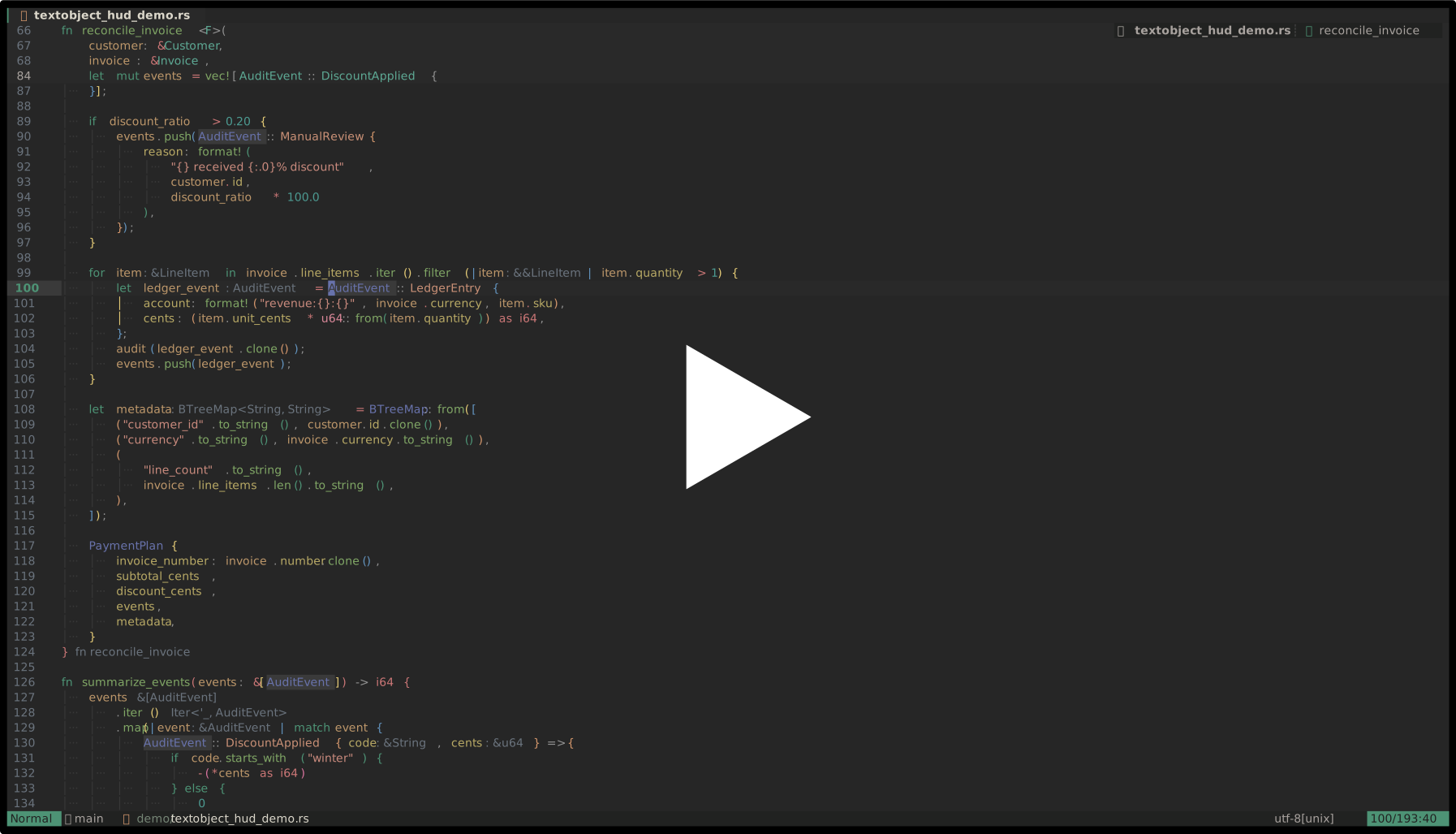
textobject-hud.nvim: a small range-aware HUD for textobjects at your cursor

Hey r/neovim,

I've been working on a small plugin called textobject-hud.nvim:

https://github.com/so1ve/textobject-hud.nvim

It shows the textobjects / selectable ranges available at your cursor in a small floating HUD.

The idea is simple: when I'm editing code, I often know that some textobject exists around the cursor, but I don't always remember the exact mapping or which range I'm about to select. This plugin gives me a small picker-like HUD that shows the candidates, previews the exact range, and lets me select it.

Demo

asciicast

What it does

  • Collects textobject / range candidates from configurable sources
  • Shows them in a small floating HUD
  • Previews the exact source range under the HUD cursor

And you can move with native window navigation (j, k, arrows, <C-d>, <C-u>, mouse, etc.), confirm select with <CR>, and close the HUD with q or <Esc>.

Builtin sources

Currently it supports:

  • Tree-sitter textobject captures from textobjects.scm
  • mini.ai textobjects
  • Tree-sitter ancestors

Sources are configured explicitly:

local hud = require("textobject-hud")

hud.setup({
  sources = {
    hud.sources.treesitter,
    hud.sources.mini_ai,
  },
})

Key hints

The plugin does not define or remap your textobjects.

Instead, key_hints are display-only annotations. This lets the HUD show your existing mappings without owning them:

require("textobject-hud").setup({
  key_hints = {
    ["treesitter:@function.outer"] = { "]f", "[f", "]F", "[F" },
    ["treesitter:@parameter.inner"] = { "]a", "[a", "]A", "[A" },
    ["mini_ai:a("] = "a(",
  },
})

Example lazy.nvim config

{
  "so1ve/textobject-hud.nvim",
  dependencies = {
    "nvim-mini/mini.nvim",
    "nvim-treesitter/nvim-treesitter-textobjects",
  },
  keys = {
    {
      "<leader>o",
      function()
        require("textobject-hud").open()
      end,
      desc = "Open textobject HUD",
    },
  },
  opts = function()
    local hud = require("textobject-hud")

    return {
      sources = {
        hud.sources.treesitter,
        hud.sources.mini_ai,
      },
      key_hints = {
        ["treesitter:@function.outer"] = { "]f", "[f", "]F", "[F" },
        ["treesitter:@parameter.inner"] = { "]a", "[a", "]A", "[A" },
      },
    }
  end,
}

Why I made it

I wanted something that is not quite a textobject plugin and not quite a picker.

Most textobject plugins are great once you already know the mapping. But sometimes I want to inspect what ranges are available right here, compare inner / outer variants, see what Tree-sitter captures exist, or select a range without guessing.

I also think this can help people who are still getting used to textobjects. Instead of memorizing every mapping up front, you can open the HUD, see what is available at the cursor, preview the exact range, and gradually learn how different textobjects behave.

So this plugin tries to be a lightweight "what can I select here?" HUD.

Current status

It is still young, but the core flow is working:

  • Tree-sitter source
  • mini.ai source
  • key hints
  • exact range preview
  • range-aware floating placement

I'd love feedback on:

  • useful additional sources
  • better naming / UI copy
  • whether this overlaps with something I missed
  • whether the source API feels reasonable

Thanks!

reddit.com
u/Asleep-Apartment6716 — 3 months ago
▲ 0 r/neovim

snacks-fff.nvim: a Snacks picker frontend that tries to preserve fff.nvim's picker experience

Hi, I made a small Neovim plugin: snacks-fff.nvim.

Repo: https://github.com/so1ve/snacks-fff.nvim

The idea is simple: use fff.nvim as the backend, but render the picker through snacks.nvim.

I like fff.nvim’s backend and its original result presentation, especially for grep results. But I also prefer Snacks picker's API, layouts, previews, and default keymaps. This plugin tries to combine those two things without replacing fff's search logic.

What it currently does:

  • file search through fff's file backend
  • live grep through fff's grep backend
  • Snacks picker UI
  • fff-style file rows with git signs/icons
  • grep results grouped by file
  • file headers rendered as visual-only rows, not selectable picker items
  • <S-Tab> grep mode hint in the input area
  • plain / regex / fuzzy grep mode cycling
  • no-results fallback with file suggestions

Example:

require("snacks-fff").find_files()
require("snacks-fff").live_grep()
require("snacks-fff").grep_word()

With lazy.nvim:

{
  "so1ve/snacks-fff.nvim",
  dependencies = {
    "folke/snacks.nvim",
    {
      "dmtrKovalenko/fff.nvim",
      build = function()
        require("fff.download").download_or_build_binary()
      end,
    },
  },
}

There is already another plugin called fff-snacks.nvim. This project is not meant to replace it. The main difference is that this one is more focused on recreating the original fff picker behavior inside Snacks, rather than being only a lightweight adapter.

Caveats:

  • This uses some internal APIs from both Snacks and fff.nvim.
  • It is still new.
  • Most of the code was written with AI assistance, mainly GPT-5.5, and I mention that in the README.

Feedback is welcome, especially from people who use both Snacks picker and fff.nvim.

reddit.com
u/Asleep-Apartment6716 — 3 months ago