![[v2] ALTRun – an Alfred-style launcher for Windows, written entirely in AutoHotkey v2 (open source, <1 MB)](https://external-preview.redd.it/DxX5Kxs_GCk8jpROqNyYXnLDYFrRSLGY5b6cCchWxWA.png?width=640&crop=smart&auto=webp&s=21197cff6b2d1c2faab51a2041923dbd3c16304d)
[v2] ALTRun – an Alfred-style launcher for Windows, written entirely in AutoHotkey v2 (open source, <1 MB)
Hi all,
I'd like to share a project I've been working on and using every day: ALTRun, a keyboard-first launcher for Windows, written entirely in AutoHotkey v2.
Press Alt+Space, type a few letters, press Enter: launch apps, find files, do math, search the web or paste from clipboard history, all from one window.
Screenshot: https://raw.githubusercontent.com/zhugecaomao/ALTRun/main/docs/images/screenshots/search.png
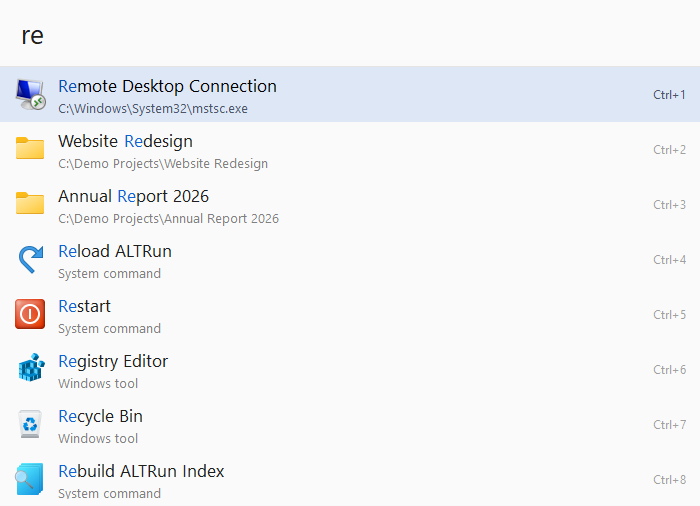
Background
For years I used the classic ALTRun (Pascal / Delphi) and RunZ (AutoHotkey). Both were small and snappy, but I wanted more: Everything integration, clipboard history, snippets and a more modern UI. So I rewrote it from scratch in AHK v2. It keeps the ALTRun name as a tribute, borrows ideas from RunZ, and follows Alfred's interaction model.
Features
- Tiny and portable: one compiled
ALTRun.exe(under 1 MB download, about 2 MB unpacked). No installer, no registry, no admin rights. Settings live in a JSON file in theData\folder next to the exe. - Search: Start menu, desktop and Microsoft Store apps; files and folders via Everything or a built-in index; type a path like
C:\Projects\to browse folders, withTabcompletion. - Smart ranking: learns which result you pick for each query, matches word initials (
vsc→ Visual Studio Code) and highlights the matched characters. - All in one: calculator (units, hex/bin, date math, optional currency), web search keywords, browser bookmarks, clipboard history (text, files and images, with pinning), snippets with
;keywordexpansion, window switcher, 40+ Windows Settings pages, and system commands. - Keyboard first:
→opens an action panel (run as admin, open location, copy path, properties…),F3edits in place,Ctrl+1…Ctrl+9run the Nth row, and?shows a built-in cheat sheet. - Scripts folder: drop
.ahk,.ps1,.bator.pyfiles intoScripts\and they become commands. They can take arguments, or run in the background and show their output. - Dialog jump (like Listary's Quick Switch): in Open / Save dialogs, jump straight to the current Explorer or Total Commander folder.
- Themes and languages: 20 built-in themes (or follow Windows light/dark mode) and an English, Chinese or Japanese UI.
- Private: no telemetry. It only goes online to check for updates (plus daily exchange rates if you turn on currency conversion). Updates install from the search window and are SHA256-verified.
A few notes for AHK folks
- You can run it from source (
ALTRun.ahk) if you have AHK v2 installed; the release exe is compiled with Ahk2Exe. - The code is split into providers (apps, files, calculator, clipboard, snippets, windows…), each returning result items to a shared ranking and UI layer, so adding a new source is fairly contained.
- There are 7,000+ tests, run on a Windows runner for every pull request.
- GPL-3.0. Issues and PRs in English are welcome (the wiki is mostly in Chinese for now, but the UI and README have English).
Links
- GitHub: https://github.com/zhugecaomao/ALTRun
- Download: https://github.com/zhugecaomao/ALTRun/releases/latest
- Scoop:
scoop bucket add altrun https://github.com/zhugecaomao/ALTRunthenscoop install altrun
I'd love feedback, especially on what feels clunky or what you'd expect from a launcher that isn't there yet. Thanks for taking a look!