r/compression

misa77: ridiculously fast decompression at good ratios
▲ 24 r/compression+2 crossposts

misa77: ridiculously fast decompression at good ratios

Hello, I'd like to share misa77, a codec I've been working on for some time now.

Source Code: https://github.com/welcome-to-the-sunny-side/misa77

misa77 is a LZ-based codec that targets the write-once, read-many niche. In particular, it aims to satisfy the following criteria:

  • Extremely high decompression throughput (single-threaded).
  • Modest compression ratios (it has no entropy backend, so one can obviously not compare it to something like zstd, but LZ4 at high effort levels is a good reference point).
  • Constant memory use, regardless of input size (<= 5 MB across all compression modes, and 0 MB for decompression).

Slow compression is the obvious tradeoff that one makes to achieve the above.

In addition, misa77 has a somewhat synergizing tendency to decompress highly compressed files faster, leading to the following results:

  • It offers particularly high decompression throughput on highly compressible files.
  • Even for moderately compressible files, spending more effort during compression to get a more compressed result leads to better decompression throughput (alongside the natural advantage of better ratios).

This makes high-effort compression particularly attractive for misa77, and inspires some experimental compression modes that aim to spend more effort at compression time to produce a compressed stream that is friendlier to the microarchitectures of most CPUs when decompressing said streams. As of v0.1.0, there are two experimental compressors:

  • misa77::experimental::adaptive_compress for homogeneous data.
  • misa77::experimental::yolo_compress, which is more general-purpose and has lesser overhead than (1).

Benchmarks

Detailed results are listed ahead, but here's a terse summary:

  • misa77 lies on the pareto frontier for decompression throughput vs compression ratio on most shapes of data.
  • It very frequently decompresses faster even when competitors have a significantly worse ratio.
  • It is quite slow at compression (although this isn't fundamental, I just haven't spent that much time optimizing compression as of now).

All benchmarks were run using https://github.com/welcome-to-the-sunny-side/lzbench (fork of lzbench) and can be reproduced easily. For the codecs below, I've used flags that yield a similar compression ratio to misa77.

x86-64 (Intel)

Details:

  • CPU: Intel(R) Core(TM) i7-14650HX (@2.2 GHz) (Intel Turbo disabled).
  • Single threaded, pinned to a single performance core.
  • CPU governor set to performance.
Compressor name Compression Decompress. Ratio Filename
misa77 0.1.0 43.9 MB/s 4285 MB/s 39.62 silesia.tar
misa77 0.1.0 yolo 7.68 MB/s 5513 MB/s 42.75 silesia.tar
lz4 1.10.0 370 MB/s 2512 MB/s 47.59 silesia.tar
lz4hc 1.10.0 -12 7.31 MB/s 2534 MB/s 36.45 silesia.tar
lizard 2.1 -10 323 MB/s 2452 MB/s 48.79 silesia.tar
lzsse4fast 2019-04-18 186 MB/s 2538 MB/s 45.26 silesia.tar
lzsse8fast 2019-04-18 183 MB/s 2668 MB/s 44.80 silesia.tar
zxc 0.12.0 -3 115 MB/s 2839 MB/s 45.46 silesia.tar
zxc 0.12.0 -4 81.0 MB/s 2727 MB/s 42.63 silesia.tar
zxc 0.12.0 -5 48.7 MB/s 2599 MB/s 40.25 silesia.tar
zstd 1.5.7 -1 297 MB/s 902 MB/s 34.54 silesia.tar
snappy 1.2.2 376 MB/s 857 MB/s 47.89 silesia.tar

x86-64 (AMD)

Details:

  • CPU: AMD Ryzen 7 260 (@3.8 GHz) (Frequency boost disabled).
Compressor name Compression Decompress. Ratio Filename
misa77 0.1.0 71.3 MB/s 6220 MB/s 39.62 silesia.tar
misa77 0.1.0 yolo 13.7 MB/s 7832 MB/s 42.75 silesia.tar
lz4 1.10.0 693 MB/s 4455 MB/s 47.59 silesia.tar
lz4hc 1.10.0 -12 12.8 MB/s 4326 MB/s 36.45 silesia.tar
lizard 2.1 -10 573 MB/s 2887 MB/s 48.78 silesia.tar
lzsse4fast 2019-04-18 323 MB/s 4195 MB/s 45.26 silesia.tar
lzsse8fast 2019-04-18 311 MB/s 4416 MB/s 44.80 silesia.tar
zxc 0.12.0 -3 213 MB/s 4935 MB/s 45.99 silesia.tar
zxc 0.12.0 -4 151 MB/s 4776 MB/s 43.04 silesia.tar
zxc 0.12.0 -5 87.3 MB/s 4570 MB/s 40.29 silesia.tar
zstd 1.5.7 -1 491 MB/s 1598 MB/s 34.55 silesia.tar
snappy 1.2.2 691 MB/s 1355 MB/s 47.85 silesia.tar

ARM64 (Apple Silicon)

Details:

  • CPU: Apple M3
Compressor name Compression Decompress. Ratio Filename
misa77 0.1.0 94.3 MB/s 10007 MB/s 39.62 silesia.tar
misa77 0.1.0 yolo 17.1 MB/s 13088 MB/s 42.75 silesia.tar
lz4 1.10.0 881 MB/s 5173 MB/s 47.59 silesia.tar
lz4hc 1.10.0 -12 17.0 MB/s 4874 MB/s 36.45 silesia.tar
zxc 0.12.0 -3 276 MB/s 8010 MB/s 45.77 silesia.tar
zxc 0.12.0 -4 192 MB/s 7628 MB/s 43.20 silesia.tar
zxc 0.12.0 -5 114 MB/s 7126 MB/s 40.30 silesia.tar
snappy 1.2.2 966 MB/s 3438 MB/s 47.91 silesia.tar
zstd 1.5.7 -1 714 MB/s 1614 MB/s 34.54 silesia.tar
lizard 2.1 -10 830 MB/s 6530 MB/s 48.78 silesia.tar

Per-File on x86-64 (Intel)

As misa77's performance is quite "spiky" (depending on the shape of the data being compressed), a file-level breakdown for the silesia corpus yields some interesting insights into its performance. ​

Decode speed relative to lz4

Every misa77 mode decodes faster than lz4 on 11 of the 12 files (some by huge margins). The exception is x-ray, which is highly incompressible (lz4 has a ratio of nearly 1.0 on this file and essentially devolves to a memcpy).

Figure: https://raw.githubusercontent.com/welcome-to-the-sunny-side/misa77/refs/heads/main/misc/lzbench-results-archive/0.1.0/speedup_vs_lz4.png

Throughput vs ratio, against popular fast-decode codecs

On the compressible files, misa77 sits on the decode-throughput/ratio Pareto frontier: it decodes fastest while ~matching or beating the ratio of the other fast-LZ codecs. sao and x-ray are exceptions due to the reasons stated before (incompressibility).

Figure: https://raw.githubusercontent.com/welcome-to-the-sunny-side/misa77/refs/heads/main/misc/lzbench-results-archive/0.1.0/pareto_silesia.png

I'd be happy to receive feedback/answer queries about misa77 :)

Also I will pre-emptively note that I'm aware of how slow compression is right now, and I don't think it's going to be that hard to speed up (I just need to spend some time on it).

▲ 7 r/compression+5 crossposts

I built a memory sidecar for Ollama that compresses 1,000 sessions into 12KB — open source, no cloud, no fine-tuning

Every Ollama session starts cold. You re-explain your stack, your preferences, your domain — every time.

I built fg-sync: a CLI sidecar that sits alongside Ollama, captures your conversation patterns, and compresses them into a compact behavioral ruleset (~12KB) using fractal grammar extraction + hyperdimensional computing. It then injects that ruleset as a system prompt prefix on every request automatically.

Measured results:
- ~82:1 compression vs raw conversation history
- AssociativeMemory footprint flat at 39KB regardless of session count
- Works with any Ollama client — just point at port 11435 instead of 11434

Pre-release v0.1.0. Known limitations documented honestly in KNOWN_LIMITATIONS.md.

Repo: https://github.com/GreenbarSystems/fractal-grammar
Whitepaper (Zenodo): https://zenodo.org/records/XXXXXXX

u/sneezy_dwarf952 — 7 days ago

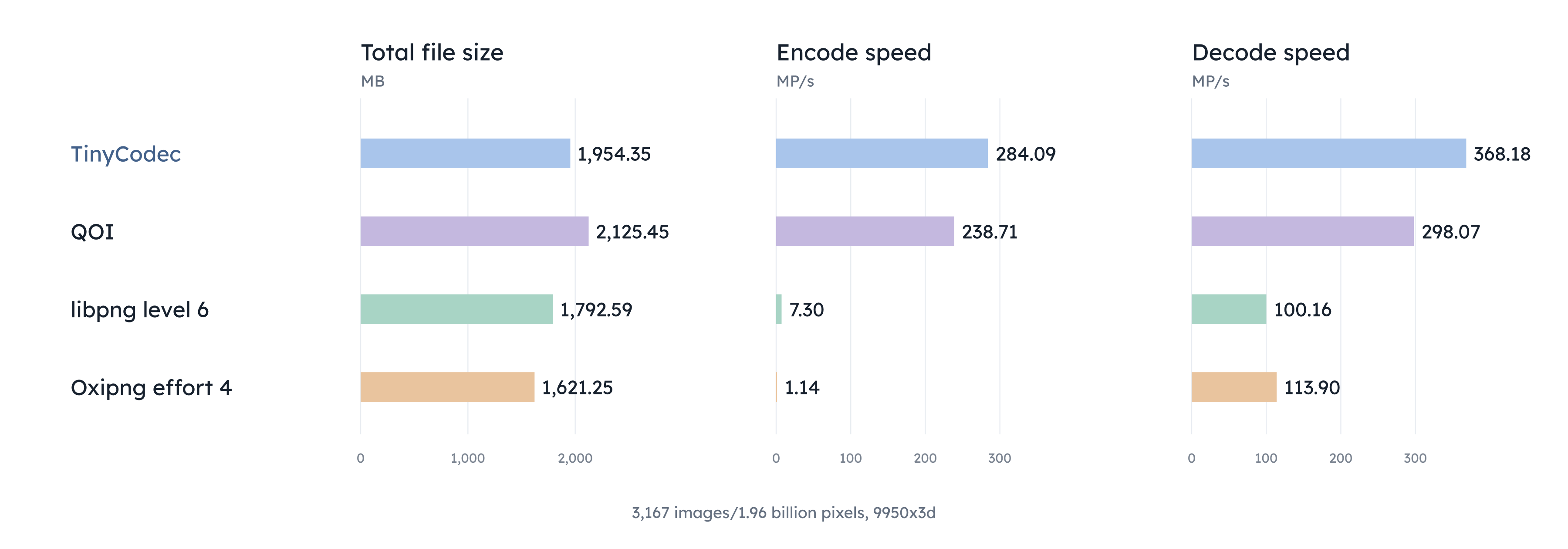
SLIM: a lossless image and video codec built on QOIR

At work I sometimes need to collect terabytes of video very fast, and it is usually done in an extreme operating environment that prevents me from just buying more drives. A few months ago an experiment went a little long and overflowed all available drives with imagery, so I started looking for lossless compression options that are very fast to encode. That led me to the exceptionally elegant QOI format, and from there the more performant QOIR, which I've based my own solution on. (Apache 2.0 license.)

https://gitlab.com/csp256/slim - very much still a work in progress! and beware, QOI's elegance is long gone at this point

I was already working on a container called Slate, so I'm calling this SLIM - the Slate Image format. On that same data that overflowed my drives, SLIM reaches speeds in excess of 4 GB/s on my 2023 MacBook Air to achieve a 0.019 compression ratio. On some modes it beats 0.010 ratio, or 100x compression. optipng -o0 is 38% larger and 40 times slower. jpeg-xl e1 is 22% smaller, but 23 times slower.

Preliminary benchmarks are on the GitLab, but on large RGB photographs from the FiveK data set SLIM achieves 0.376 at 1,238.6 MiB/s encode, comparable to PNG and JPEG-XL but drastically faster.

SLIM supports all major operating systems, threading, delta frames, masks, any data type up to 8 bytes, support for 1 to 4 channel images, improved handling of images with significant alpha gradients or low entropy regions, and a few other bespoke features.

Decode speed is not a priority and has not yet been optimized. However, it will be similar to encode. Faster, for delta frames.

It's past my bed time, but tomorrow I will provide more specifics about the format and how it varies from QOIR.


Opcode Changes

SLIM makes only a few direct modifications to QOIR. The opcode changes are particularly modest:

  • Runs of length 1 are now cannonicalized to use DIFF instead of RUNS. The bias of RUNS has been adjusted accordingly.

  • The high bit of the second byte of RUNL is reserved. RUNL's bias has been adjusted such that RUNL 0 is a run of length 1 longer than the longest amount representable by RUNS.

  • If the high bit of the second byte of RUNL is 1, then the 2 byte RUNL opcode is interpretted instead as a 3 byte RUNLL opcode, which uses the third byte and bottom 7 bits of the second byte to support runs of length up to 2^15. Tiles are 64 pixels square, or 2^16 pixels, so in principle only two RUNLL opcodes are necessary for indicating a tile is a single constant color.

  • If SLIM detects that a tile is all black (with alpha 255 if present), then SLIM may emit the entire tile payload as simply INDEX 0. Because INDEX 0 will never otherwise be emitted as the first byte of the payload there is no ambiguity for the decoder. This is subject to change. The reason for this is to make the "no change" delta frame code path compress as well as possible.

These changes have only a tiny but consistently positive impact on the QOI test suite, and a more significant positive impact on my data set.

Pack3 handling of individual channels

The more meaningful change that SLIM provides is what I call the "pack3" strategy: for 1 channel images, groups of three rows are re-interpreted to be a single row of "pseudo RGB" pixels. This provides the spatial correlations QOI-style gradient compressors want to exploit. If needed the bottom of the image is logically padded with an extra row or two that repeats the bottom row.

RGBA images with prominent alpha gradients were a weak point for QOI. QOIR significantly improves on this by adding more opcodes that express alpha changes, but SLIM also adds the optional ability to treat the alpha channel totally independent of the RGB channels by using the pack3 strategy on only that channel, and QOIR's normal RGBX strategy on the RGB channels.

Two channel images have both channels compressed with pack3 independently.

More data types

Data type lengths longer than 1 byte compress each byte plane independently, often with pack3 but sometimes with RGB.

Signed integers are zig-zag transformed before encoding and after decoding. That is to say, they are remapped such that -x and +x are adjacent to each other. Analogously, floating point values have one byte cyclically shifted by 1 such that the sign bit is now the low bit. This behavior is transparent to the user but intended to provide better support for data that changes sign frequently.

Low bytes of larger data types may be essentially incompressible so SLIM allows the user to mark them as such. Those bytes will always be emitted raw. SLIM also has experimental support for dynamically determining which bytes are incompressible. This feature is not yet tuned and may not work very well, but it seems to mitigate the most pathological cases.

Support for signed integers and floating point values is for completeness. It is not a design focus and may not perform well.

Delta frames and tile format changes

QOIR emits tiles with one of 4 modes: raw or as opcodes, and either unmodified or subsequently lz4 compressed. SLIM extends this with another axis: as an intra frame or as a delta to the previous frame. Because storing raw deltas uncompressed never makes sense (you could just store the raw frame in the same size), SLIM reserves tile mode 0x04 to indicate that this tile had no change from the previous frame. The payload length is 0 in this case. Tile modes 0x05 through 0x07 are identical to 0x01 to 0x03 except on delta images.

Delta frames are logically zig-zag coded versions of the signed difference relative to reference, packed into the original byte size. That is to say: the case where a pixel is 0 in one frame and saturating 255 the next (or vice versa) is properly handled. It will not be neglected just because it is a cyclic distance of just 1, even if a lossy mode telling SLIM to ignore small changes is enabled.

By default SLIM does not try to compress raw frames if given a reference frame from which to form a delta image. However if you want better compression at the cost of halving the speed, SLIM allows you to specify that compression should also be attempted on raw frames. Smallest wins.

QOIR optionally allows tiles to be emitted out of order. This is intended to help in multithreaded workloads with uneven workloads. A 4 byte tile index is prepended to each tile in this case.

Lossy modes

SLIM supports a couple different lossy modes, specifically for unsigned integer data types. The first is the noise_floor: values below the noise floor are raised to the noise floor before encoding, and values equal to the noise floor are dropped back to the noise floor. This is to decrease the gradient QOIR sees. The noise floor may only be 1 byte, but there is support for all data types and it can be set per-channel. While this transform is only applied to the low byte, it ensures that higher bytes are all 0. The purpose of this setting is to suppress spurious counts caused by leaky currents, thermal effects, etc in what would otherwise be a near perfectly black environment.

The second lossy mode is similar, except it is applied to delta images. I don't recommend this mode, because long sequences of delta frames can drift arbitrarily from the last intra frame as long as the change is gradual.

The third (and perhaps final) lossy mode is a bad pixel mask, supplied either as a u8 image or sequence of pixel positions. It can be applied to all channels or per channel. The mask can optionally also be embedded within the SLIM file. Pixels marked by the mask (values >= 128) are treated as if they're identical to the previous pixel. Note: currently, if the first pixel of a tile is marked bad it will be replaced with black (opaque if alpha present). I intend to modify this case to scan for the next good pixel instead.

Misc

SLIM has a variable length header that can encode arbitrary length user data. SLIM files currently do not have support for image sequences, but once they do it will also support per-frame metadata.

SLIM does not yet support premultiplied alpha, but it will be added eventually.

There is currently no special handling of limited bit depths, but I'm open to ideas!

SLIM has a recovery utility that can attempt to recover corrupted files, especially those that might be caused by sudden power loss during encoding or writing.

SLIM files typically have an entropy of 7.5 bits per byte, so entropy coding could in principle shrink the file by about 7%, but SLIM does not emphasize compression ratio to an extent where that is currently in-scope.

u/The_Northern_Light — 8 days ago

(Please help)! Parquet compression issue

Hi guys,

I have data where it have 80 columns of float64 that is then stored into a single parquet file with raw size of 31MB

I tried compression on it with multiple algorithms zstd, snappy, brotli, gzip and others that are there but all of them were only able to reduce the size to at max 29MB even on max level of compression**.**

In reality the data is around 22.5 GB I tested for a small subset of data.

but even for 22.5 GB it doesnt make much of a difference. how to compress it to atleast 30-40% of its original size

library used: parquet-go
language: golang

reddit.com
u/Danaykroid — 8 days ago

lzmpo - memory-heavy LZ77 compressor

Hello everyone!

I'd like to share my latest (and first in the field of compression) project being a new LZ77-based compressor. It is built around the idea that when looking for a match to, say, string "abc123456", the parser will find many places where data starts with "abcX", such that X is not "1", and very few places where data starts with "abc123".

lzmpo is memory-heavy because it builds hash chains which link positions where data of length X gives the same hash. Multiple chains are computed for each length from a list, and parser tries to find matches by jumping along these hash chains starting with the one that corresponds to the greatest length of the data hashed (as collisions in that chain are the least likely to happen).

My compressor is designed to work well with big files (like enwik9) yielding results that are comparable to zstd in terms of decompression speed (sitting at about 70-80% of it) but having much better ratios (20.4% vs 21.37% of zstd). As for the negatives, it uses about 50GB of RAM when compressing enwik9, and generally takes longer to finish.

UPD1: Core ideas used:

  1. lzmpo operates on the entire file, which, when paired with the next ideas, allows it to reach good ratios. My calculations show that a substantial portion of the generated matches (35%) are at distances >10% of the file size, and about 15% of all matches are at distances >50% of the file size (tested on enwik).
  2. lzmpo builds multiple hashchains for substrings for different lengths. When parser is looking for a match, it uses the chain that corresponds to the greatest length, which is more likely to result in a longer match.
  3. lzmpo splits data into blocks which are then calcualted by threads.
  4. Within each block, true optimal parsing is done: the parser collects all possible matches of length up to 256 for each position withing the block, and then proceedes to find the optimal coverage of the block with matches. My calculations show that limiting match length by 256 is not hurting the performance, as 99% of generated matches are of length <50 (when used with `-9` level). Note: when looking for matches, parser is NOT limited by the current block, it looks in the entire file history up to the current position.
  5. Cost of a match is estimated in two ways: in the first pass, it is a simple heuristic. On subsequent passes, results of previous pass are used, and cost of a token is roughly its entropy according to the stream of tokens generated by the previous pass.
  6. There are many entropy encoders supported, with the best one being Turbo-Range-Coder, but the second best one and the fastest one (in terms of decompression) being rans_static order0 avx2.

The project homepage is https://github.com/lis05/lzmpo, you can find the detailed explanation of how it works in the README.

Results on enwik9:

File: enwik9
────  ───────────  ─────────  ────────────  ────────  ────────────  ────────
Rank  Compressor   Ratio      C.Speed MB/s  C.Mem MB  D.Speed MB/s  D.Mem MB
────  ───────────  ─────────  ────────────  ────────  ────────────  ────────
*     lzmpo -9rc   20.07113%  0.18          51312.9   78.93         1556.8
1     lzmpo -9     20.40550%  0.18          51312.9   495.27        1559.9  
2     lzmpo -8     20.42281%  0.27          51312.9   496.24        1560.8  
3     lzmpo -7     20.46996%  0.43          51312.9   499.47        1561.8  
4     lzmpo -6     20.53418%  0.76          47498.2   507.15        1562.3  
5     lzmpo -5     20.55473%  0.86          47498.2   477.80        1563.1  
6     lzmpo -4     20.60857%  1.44          32880.9   500.05        1565.2  
7     lzmpo -3     20.99710%  2.66          29066.2   485.98        1578.7  
8     zstd -22     21.37212%  1.76          8669.9    638.34        215.7   
9     xz -9        21.56742%  5.36          5653.8    466.15        1528.2  
10    lzmpo -2     22.20778%  5.13          20040.4   465.42        1632.5  
11    brotli -q11  22.33457%  0.58          247.0     321.60        22.5    
12    lzmpo -1     23.20203%  8.16          20119.5   454.98        1677.4  
13    xz -5        23.68271%  19.21         3729.1    1047.92       1137.3  
14    zstd -18     23.95552%  11.59         1698.5    969.48        151.4   
15    brotli -q9   25.17618%  3.68          128.6     349.06        22.8    
16    lzmpo -0     26.13254%  16.88         12858.7   435.32        1827.6 

I would appreciate some feedback and just general thoughts / suggestions. While not a practical compressor, I think it could be used as a decompressor without big sacrifices.

Best regards.

(original thread on encode.su: https://encode.su/threads/4513-lzmpo-memory-heavy-LZ77-compressor)

u/Specialist_Data_5403 — 7 days ago

Can this improved compression?

Let me start by saying I know nothing about programming. I am a science physics in mathematics nerd but I barely run Linux mint well. So on base knowledge of programming on a 0 to 10 scale just put me somewhere in the negatives.

So here's the base idea. From what I can tell and I am more than likely wrong compression seems to be about taking a base set of information and using different algorithms to make a smaller version of it without losing data.

I know it's not accurate, but (1.13 e25) is a good example from what I understand. A smaller set of numbers with the understanding of what they mean reference is a larger set.

This is just a concept and it's definitely not worked out because I know nothing of programming but I want to know why a different set of numbers isn't referenced for compression.

For example, a set of four coordinates within the mandelbrot set can give you a ton of information to reference for all kinds of things. A full array of color display, a full array of clumps of colors and interactions and more!.

Is there a data set we could put together that could be referenced by a compression program that would allow for ease of compression and decompression of data?

Maybe it's a set of colors changing to a different set of colors and a gif or something similar that has all of the possibilities of this. A set of two coordinates and then a number of frames to reference what you're looking for could compress data by more than 80%, right?

I'm probably not explaining it right, but I'm hoping the concept is coming across well.

Again, I have no idea what in the hell I'm talking about and I'm sure this is dunning-kruger. But to the completely uneducated it seems rational....

If I'm right, hopefully it can be a very beneficial. If I'm wrong I would love to know why.

Tldr: why don't we store a referential data set on our devices that a compression folder can reference to increase the capabilities of compression? Can we cheat and store most of the compressed data on the devices side? Why does it have to be within the files themselves?

reddit.com
u/Alarmed_Impact_1971 — 11 days ago
▲ 107 r/compression+1 crossposts

Overfitted a 900KB LLM to compress a 100MB csv into 7MB

PymParticles is an experimental neural compression system that combines a Transformer language model with arithmetic coding to compress individual files.

Instead of training on a large corpus, the model is intentionally overfitted to a single target file. By memorizing and modeling the file's unique byte-level patterns, the Transformer learns to predict the next byte with high confidence. These predictions are then converted into compact probability distributions and encoded using arithmetic coding.

Checkout the Repo Here

reddit.com
u/Spidy__ — 13 days ago
▲ 0 r/compression+1 crossposts

JPEG-XL vs AVIF

I've been spending a lot of time researching and writing about image compression. I'd love to hear your thoughts on a recent post! You can find the link below, along with the full archive for this topic:

TL;DR: JPEG-XL vs. AVIF

  • AVIF is the overall winner for web developers. Its aggressive compression algorithms and widespread browser support make it the undisputed champion for bandwidth savings.
  • However, JPEG-XL remains an incredibly powerful format with distinct advantages for professional photography, lossless archival, and environments where retaining exact film grain and texture is critical.

https://www.coderevere.com/jpegxl-vs-avif/

https://www.coderevere.com/categories/image-compression/

reddit.com
u/billu51 — 11 days ago
▲ 0 r/compression+1 crossposts

Strange colors when watching facebook reels

I was watching this video on facebook and suddenly, this happened to the video for 2-3 seconds then disappeared, rewinded the video and appeared again at the same second. It's not the first time it happened but I don't remember which app I was using last time I saw it (most probably facebook)
What is it?

u/No_Manager92 — 10 days ago

Lossless Canterbury corpus result: 445,208 bytes vs xz -9e 493,080 bytes, exact round-trip

Hi r/compression,

I’m sharing a narrow benchmark result for an experimental private lossless compressor and would like technical feedback / independent sanity checks.

This is not a global SOTA claim. It is only a measured Canterbury corpus result.

Benchmark:

Dataset: Canterbury corpus
Raw total size: 2,810,784 bytes
Round-trip decode: exact
All compressed artifact bytes counted: yes
Baseline: xz -9e

Results:

Method: Experimental private lossless compressor
Compressed size: 445,208 bytes
Exact round-trip: YES

Method: xz -9e
Compressed size: 493,080 bytes
Exact round-trip: YES

Main measured comparison:

445,208 < 493,080

So on this Canterbury run, the private compressor output is 47,872 bytes smaller than my measured xz -9e baseline.

Exact claim:

On my Canterbury corpus run, this experimental private lossless compressor produced a 445,208-byte artifact, decoded exactly back to the original corpus, and was smaller than my measured xz -9e baseline of 493,080 bytes.

I am not claiming that this beats xz universally, nor that it wins on every corpus. I am posting this to get benchmark criticism and reproducibility feedback.

Verification summary:

raw_total_bytes = 2,810,784
private_compressed = 445,208
xz_9e_compressed = 493,080
decode_exact = YES
sha256_match = YES

Round-trip verification method:

  1. Hash original Canterbury input.
  2. Compress with the private compressor.
  3. Decompress the compressed artifact.
  4. Hash decoded output.
  5. Compare original and decoded output byte-for-byte.
  6. Compare compressed artifact size against xz -9e.

Expected verification result:

SHA256 original == SHA256 decoded
byte-for-byte comparison returns success
compressed artifact size = 445,208 bytes

xz baseline command used:

xz -9e -k -c original_canterbury_input > canterbury.xz

Private compressor verification structure:

private_compressor compress original_canterbury_input output.private
private_compressor decompress output.private decoded_canterbury_output
cmp original_canterbury_input decoded_canterbury_output
wc -c output.private

Result:

output.private = 445,208 bytes
decoded output matches original exactly

Proof material:

I have a sanitized verification bundle containing the size logs, SHA256 checks, xz baseline log, and round-trip comparison log. I am keeping the implementation private for now to avoid leaking source code or algorithm details, but I can share sanitized verification material for audit/review.

What I’m asking for:

I’d appreciate feedback on whether the benchmark procedure is fair, whether xz -9e is a reasonable baseline here, what other baselines I should include, whether there is any hidden overhead I may be missing, and how best to package this for independent reproduction.

Again: this is a narrow Canterbury result, not a universal compression claim.

EDIT — fixed codec accounting:

A commenter correctly pointed out that codec/decompressor size should be disclosed.

In this setup the compressor/decompressor is the same fixed program used in encode/decode modes, so I count the fixed codec once, not twice.

Canterbury accounting:

• Private compressed output: 445,208 bytes
• Fixed codec as gzipped source: 9,780 bytes
• Output + gzipped codec source: 454,988 bytes
• Fixed codec as raw source: 36,590 bytes
• Output + raw codec source: 481,798 bytes
• Fixed codec as full unstripped executable: 78,884 bytes
• Output + full unstripped executable: 524,092 bytes
• xz -9e baseline: 493,080 bytes

So the Canterbury result remains under xz -9e when the fixed codec is counted as gzipped source or raw source.

Full disclosure: if I count the full unstripped executable binary instead, the total is 524,092 bytes, which is above xz -9e.

Corrected precise claim:

This is a bounded Canterbury win under source-count accounting, with byte-exact reconstruction.

It is not a universal compression claim, not a Hutter Prize claim, and not a multi-corpus/global claim. Silesia is measured but not yet under xz; Hutter is separate and should not be counted as a win unless final bytes say so.

Since the implementation is private, the fixed-codec-size claim would need independent verification under appropriate terms. I’m keeping the accounting public while avoiding source-code or algorithm disclosure.

---

Just to clarify the accounting philosophy:

My long-term intention is for the codec to be self-hosting / standalone, where the fixed codec representation can itself be represented through the same compression system. I understand that this is not customary benchmark accounting, and I do not want to use circular accounting as the main public claim.

So for the public Canterbury comparison, I’m using the conservative accounting:

• compressed output
• plus the fixed codec source counted once as raw source
• compared against xz -9e

That gives:

• Private compressed output: 445,208 bytes
• Fixed codec raw source: 36,590 bytes
• Output + raw source: 481,798 bytes
• xz -9e baseline: 493,080 bytes

So the clean claim is that Canterbury remains under xz -9e even with the fixed codec counted as raw source.

Separately, I may study self-hosted / internally compressed codec accounting, but I would treat that as an experimental/informational number, not the headline benchmark, unless the community agrees on a fair way to count it.

reddit.com
u/PedulliF — 14 days ago

High compression fix?

Shooting S-Gamut3/Sony S-Log3, XAVC S 4K, Embed LUT on

When I grade my footage in DaVinci I do a CST in to make it Wide Gamut, then do my grading, then CST out to Rec.709.

When I deliver to client, upload to google drive, or upload on social media, oftentimes the video comes out compresssed with a heavy saturation, quite grainy and with high contrast.

What can I do to fix this? Is it an export setting issue or something I’m doing wrong whilst filming?

Btw, using Davinci Free

reddit.com
u/lwa06 — 11 days ago

Would it be possible to make compressed file that is larger than the uncompressed data?

I'm not going to pretend to be well versed in the technicalities of file compression, but the other day I had this thought when reading about weirdness like zip bombs: could you make a file that is actually bigger than its parts?

I don't think there would be any proper use for such a file, but the idea intrigued me greatly.

reddit.com
u/Spurgoth — 13 days ago