▲ 184 r/accelerate
200k botnet of Chinese misinformation bots, at least 200 of which actively spread consistent misinformation about AI/datacenters, suspended from X
> The X Safety team conducted an investigation into suspected Chinese inauthentic accounts involved in influence operations: > > We identified a bot farm of approximately 200,000 accounts. Within this farm, we found 200 accounts posting in a manner that could manipulate a legitimate debate about American AI and energy policy. > > These posts contained claims that AI data centers are driving up household electricity prices and straining the grid. Others included AI-generated cartoons that depicted data-center operators enriching themselves at the public's expense. > > We remain committed to maintaining an open and authentic platform where people debate topics of public interest. We take seriously any attempts to undermine the integrity of the global town square and suspend accounts that violate our Authenticity policy.
https://x.com/GlobalAffairs/status/2093130747796148634
Of course people are saying “yeah right,” like somehow the whole thing is bullshit. I mean Really? This makes perfect sense. Why n eaqrth would you spend billions on cyberwarfare or actual war when a swarm of social media bots can convince an increasingly anti-AI public that “data centers are bad,” especially when so many are already so self-righteously desperate to believe it?
Look at the DeepSeek headline, “It only took $5.6 million to train a model that beats our billion-dollar models.” It tanked the US economy despite not being true. Sure, that didn't last, but do you really think China didn't notice? It’s pretty damn straightforward to see how that same tactic can be wielded as an economic weapon against the US.
I have no idea when the internet got so pro-China, but it sure as hell did. Somewhere, some government agency is laughing at how easily Americans will tear each other apart, knowing all it has to do is flood the internet with automated slop accounts and let us do the rest. And who the hell even knows what Russia is doing?
Our own administration can’t even give the country stable footing right now, which only makes the whole mess easier to exploit. Watching this unfold in real time is so maddening and heartbreaking as an American.
I'm posting this here, not because it's necessarily a good thing, but at the very least, what I've been suspecting for a long time is starting to come to light as being true. And maybe, just maybe, that might get some people to rethink their point of view.
Especially those who are somehow convinced that a data center consumes water, even though there are data centers that have been using the same water for the past decade because they recycle it, because, surprise, data centers aren't living beings that consume water and food.
u/CtrlAltDelve — 2 months ago
▲ 53 r/sysadmin
Commercial Airline Sysadmins, is there a such thing as a *good* primary system for managing flights/ticketing/etc?
Hey all,
Every time I read about downtime for an airline, inevitably the tech discussion in the comments boils down to how some of these systems are 50+ years old.
I get it, don't fix what isn't broken, and minutes of downtime can translate to $$$ of losses.
But I'm wondering if there's any of you that work in the industry who have encountered an actually good system that you like and works really well? Or are these systems just things you build up muscle memory for and ultimately just get used to?
I wanted to go hunting for examples of this kind of software to learn more about it but I literally don't even know what the search terms would be.
u/CtrlAltDelve — 2 months ago
▲ 422 r/accelerate
We talk about huge societal advances, but remember, all it takes to convert someone is finding just one use case that resonates with them...
u/CtrlAltDelve — 2 months ago
▲ 3 r/accelerate
Most Useful Personal Practical Workflow Yet - STT Work Replacement List Generation via LLM. You have to try this!
EDIT: Ah dammit. Excitement got a head of me...word replacement, not work!
I just found a genuinely awesome use case for an LLM. At least for myself, though I'm sure I'm not the first person to discover it. It's incredibly simple, and I feel like this community would appreciate it more than any other.
I use STT apps constantly and love them. VoiceInk, Spokenly, and Superwhisper locally. Parakeet is incredible. I also use built-in AI and LLM post-processing on them afterward for correction and cleanup, but one of the things that gets annoying is correcting certain words that the local model always transcribes incorrectly.
All of these apps have "Word Replacements" and user dictionaries. You can set it so if the transcribed word equals x, it rewrites it as y. That happens programmatically, not through the LLM, so it's guaranteed to work.
Spokenly lets you import a list of these replacements and export them as JSON for backup. So I had an idea.
I created a few replacement word entries.
I exported them to JSON so I could see the schema.
I fed that JSON to GPT 5.5 and told it to learn and understand the schema, then come up with a plan for creating more entries in a way that would successfully import.
It figured it out on the first try, and Spokenly successfully imported the single word replacement JSON. Now Codex knows how to use this system.
I gave Codex this prompt:
> Go ahead and read through all of our chat histories, perform a word frequency analysis, look for words that are uncommon, such as proper nouns, abbreviations, and the names of technologies, and create a list for me to pronounce into my STT tool, one after the other. Then, take the transcript in the message I send you back, assess it, and turn it into a word replacement JSON, using the word I pronounced and the mistranscribed word, which will be in the same order as your list.
It scoured through all of my personal context, since I keep my own memory system in the form of Markdown files. One by one, it started pulling up all of these various names, technologies, and other things I'd mentioned, along with a bunch of extra material. It gave me a numbered list, so all I had to do was toggle my speech-to-text, sit there, and go straight down the line pronouncing each word once in the order provided. Whatever it transcribed, Codex knew was what the STT engine thought I had said because they were in the same order. Anything it was unclear about, it asked me to clarify.
I imported it, and holy shit...this worked so freaking well. It generated this gigantic list of word replacements and even added certain variations. For instance, I talk about the macOS MPV-based player called IINA quite a bit, since I have some skills and scripts related to it. Every STT tool always transcribes that as "ena," "Ina," or even "Enuh." Codex covered all three of those spellings for me and made them three individual word replacements. Now I can safely say "IINA" into STT without ever having to worry about correcting it.
Example: https://i.postimg.cc/v86QMsMD/Clean-Shot-2026-07-12-at-21-46-33.png
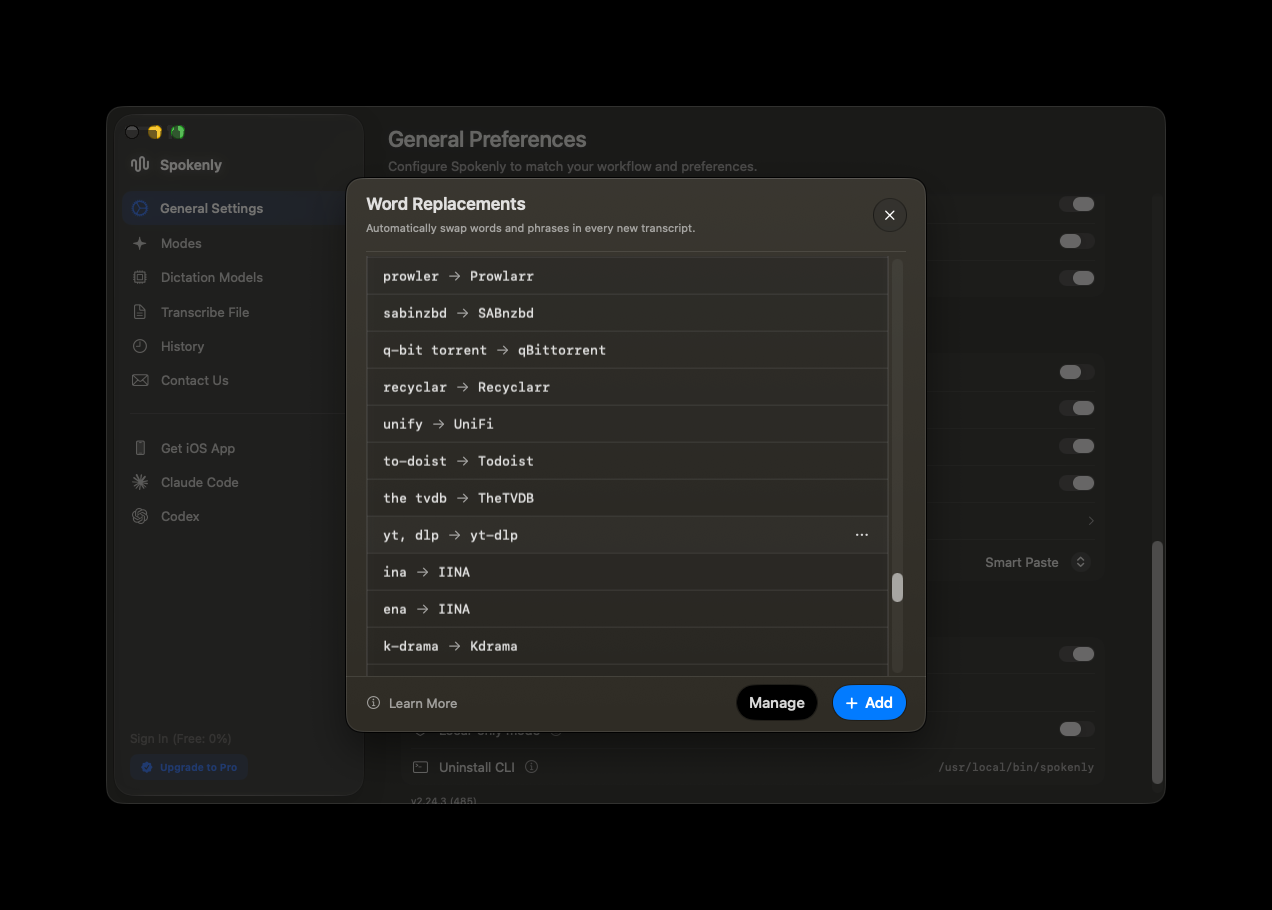
I'm so damn happy this worked because I was already a huge user of speech-to-text, but now I use it even more.
Then I went one step further and created a skill called stt-fix. It lets me use the syntax open code -> OpenCode at any point in a chat and say nothing else, and it instantly generates a JSON file with the word replacement for me to import. I can do as many as I want at a time. I've even had it review entire conversations and tell me which words it thinks might have been mispronounced but usually ignores because the built-in LLM post-processing knows what I meant to say. For instance, without replacements, the local model often hears "LOMs" when I say "LLMs," and Codex found that itself. I just review the list, and boom, I'm done.
Then I found out that the Superwhisper CLI can add these replacements directly from its command line, so I switched to that. Now, at the end of each conversation, I just have to trigger and approve and it just does it in th ebackground for me, no clicking required (Spokenly's CLI doesn't do this...yet?)
I love use cases like these. I already loved using speech-to-text apps, and now I love them even more.
Try this workflow out. You'll love it!
u/CtrlAltDelve — 3 months ago
▲ 57 r/raycastapp
V2 Beta 0.61 Out, Huge Changelog!
The newest beta is out and among many other things, they have hugely improved the text rendering and now I'm very pleased with it. No font size/config settings yet, but that's okay for now.
I'm posting it here because I didn't see anywhere that they're putting Beta changelogs, only stable ones.
If you haven't yet tried it, you should!
(not affiliated with Raycast)
New
- AI: New Quick Fix command to quickly fix spelling
- AI: New settings to configure the default model for each AI feature
Improvements
- AI Chat: Improved startup and window reveal performance
- AI Chat: Added line wrapping for code blocks
- AI Chat: Added native full-screen support for the non-floating AI Chat window
- Core: Improved text rendering
- Core: Improved liquid glass controls when the window is blurred
- Dictation: Added support for dictation in root search
- Dictation: Improved cancellation behavior
- Dictation: Added Dia, Helium, Zen, and Orion browser support for Styles
- Settings: Improved Switch component states/interactions
- Script Commands: Script command output is now selectable
- Store: Improved stability of Store results while loading
- Translate: Use Selected Text as Source now works via root search as well as via hotkey
- Window Management: Add support for Quick Look panels
- General: Reduced memory usage for app icons
Fixes
- AI Chat: Fixed selecting reasoning effort resetting model
- AI Chat: Fixed indented markdown rendering
- AI Chat: Fixed new chats opening blank after triggering an AI Command
- AI Chat: Fixed drafts not preserving newlines
- AI Chat: Fixed scrolling to the wrong position after sending a message
- AI Chat: Fixed tab order in the chat UI
- AI Chat: Fixed pagination cursor overlap
- Applications: Use alternate name for Creator Studio apps
- Calendar: Google Meet meeting URLs now include the calendar account email
- Core: Prevent default right-click menu inside popovers
- Core: Allow running several instances of Raycast with different users in the context of Fast User Switching
- Clipboard History: Fix missing Open With and Show in Finder actions for some images
- Clipboard History: Improve reliability for restricted user accounts
- Dictionary: Fixed duplicates in filter panel
- Dictation: Fixed statistics display for large values
- Extensions: Fixed menu bar items not using the system appearance
- File Search: Improved search for files and directories using non-Latin alphabets
- File Search: Fixed an issue which could cause searches to hang the Raycast UI
- General: Fix issues using Raycast v2 in multi-user environments
- Hotkey Recorder: Fixed L⌥ + R⌥ (or any other modifier) not triggering a double tap hotkey ⌥⌥
- Hotkey Recorder: Fixed ⌥⌥ hotkey triggered when pressing ⌥+Space twice
- Hotkeys: Fixed an issue which had hotkeys for disabled commands still respond
- Hotkeys: Fixed hotkey registration when re-enabling a command
- Hyper Key: Improve reliability after restoring from secure input or lock screen
- Import: Improved reliability of Snippet keyword registration after import
- Import: Fix missing open-with application after importing Quicklinks from v1
- Import: Fix occasional hang when running the v1 migration
- Menu Bar: Fix crash when toggling Menu Bar commands
- Onboarding: Tweaked copy of transfer setup to show correct command name
- Permissions: Improved handling of Calendar and Contacts permissions
- Permissions: Fixed an issue where Raycast would not open System Settings when requesting access for a denied permission
- Root Search: Fixed flickering empty state while typing
- Root Search: Fixed duplicate script commands breaking root search list
- Root Search: Renamed "Preferences" section to "System Settings"
- Root Search: Fixed an issue where wrong command ids would show up in HUD after favoriting
- Settings: Fixed double padding issue in Shortcuts settings view
- Settings: Fixed scrollbar not updating when expanding/collapsing sections in Shortcuts settings view
- Settings: Fixed Switch rendering on non-retina displays
- Updater: Surface more detailed error when the updater fails
- Window Management: Improved reliability and silenced some spurious warnings
u/CtrlAltDelve — 5 months ago
▲ 22 r/raycastapp
Raycast V2 Beta Feedback
Hey there, I wanted to provide some feedback on the new Raycast V2 Beta which I just got into today.
Version: 0.58.1.0
MacOS: 26.4.1
HW: Macbook Pro 16, M5 Max 40c, 128GB/4TB
Monitor: Alienware AW3821DW
Raycast Subscription: Pro (w/o Advanced AI).
NOTE: I know there's currently some impatience and frustration from some Raycast users here, and I don't want this to turn into a thread where everyone just piles on hate. I'm leaving this detailed feedback because I love this app and I use it dozens and dozens of times a day. So please be constructive to the Raycast team if you are going to reply to this thread! <3
Visuals
- Font rendering seems to be off - comparing the two, the original's font seems to be a little thicker and smoother
- In the OpenAI Codex app, when they recently added "Native macOS Font Smoothing", I found that I actually preferred it off. Maybe that's the same thing here?
- In particular, notice how much worse the "Open Command" text looks compared to the previous one.
- Please let me disable the bottom fade-out - I'm sure it's aesthetically pleasing and in line with Liquid Glass, but given the limited height of the Raycast window, I don't want to obscure any of it
- If it's about making sure the user is aware that there is more to scroll, I get it, but also, this is Raycast...I will assume there is more unless I start typing and it shows me otherwise :)


Onboarding
- Migration to the new one felt pretty seamless. For those who don't know, it walks you through everything in one step and disables all previous shortcuts:
- Had 70 extensions, it would have been nice if the setup let me continue through while extensions continued downloading instead of having to wait. For a one-time migration, really not a big deal, just throwing that in there!


Performance
- Double-tap CMD to open window switcher is unreliable - quite a few instances where it doesn't launch, or it launches delayed
- This is a massive problem for me - my muscle memory has taught me that I can rapidly type "CMD-CMD +
iter" and press enter to instantly get to iTerm - Lately, I've been accidentally typing "it" into dialogs and text editors
- When Raycast does trigger, because of how long it takes, it misses the
iand starts typingter- because of the fuzzy searching this means that sometimes Telegram gets triggered instead of iTerm - I have changed over to Switch for my window switcher needs now.
- This is a massive problem for me - my muscle memory has taught me that I can rapidly type "CMD-CMD +
Extensions UX
- I understand that being able to fully manage and change extensions settings straight from the launcher including shortcuts is a newish feature (which is nice!), but navigating settings for Extensions feels like it's gotten heavier and more clunky. Sometimes I want to do some extended amount of tweaking to my extensions, learn what the commands that come with an extension do, etc.
- The settings window needs to be resizable, I think it's too constricted for this newer less dense layout
- The lack of searching through my extensions all at once with the original filter bar is a downgrade (both built-in + custom extensions)
- I understand why it made more sense to separate out Shortcuts into its own dedicated menu, but if I want to quickly find an extension like Antinote, I have to go scrolling for it
- I think I preferred the old method of extension management, where extension settings, aliases, and hotkeys were all in the same "table" which operated under the same "filter"
- I have an AI Command called "Fix Spelling and Grammar". Yes, I can go to Shortcuts → CMD+F → type "Fix" to find it, but the only thing I can do from this menu is change alias or shortcut: https://i.imgur.com/N3LlaW5.png
- In V1, I could hit a button and directly edit it there: https://i.imgur.com/R0vdRTA.png
- In V2 I need to go to AI, then Commands, then find my command manually (since there's no search here), and once I do, I have to tap the 3 dots (which is a tiny, tiny little button) to get to the "Edit" part: https://i.imgur.com/UDqjx0B.png
- If it was up to me, I think I'd create a unified "Control Panel" tab instead that has fuzzy search, where fuzzy search searches through every single built-in Raycast option title, both built in and third party extension title, description, command list, and command description (important one), and allow for managing shortcuts, aliases, and invidiual command settings all in one go from here.


Dictation
Really not having a good experience with dictation. When I go to set the shortcut, I press left OPT once. It shows up as Option, and then continues to cycle through its little tutorial that shows me I can single tap, double tap, or use a sequence. Only a double tap would register?
https://i.imgur.com/a8HtFt3.mp4
Feedback & Community
The built in App Feedback tool is a bit frustrating.
- Category/Sub-Category picker is extra work to do each and every time. I'm sure this is routing to some ticketing system on your backend, so I understand why it's there.
- Some categories don't exist. I didn't see a "Dictation" category (presumably because Dictation is a beta feature and you're reusing the stable feedback tool).
- The window is not resizable.
- The file picker doesn't allow for CMD V to paste in screenshots, which is another stepping stone in the way of feedback
I just want to throw this out there: One of the things that AI is phenomenal at is sorting and differentiating between data...I'd consider utilizing a cheaper LLM model that is fully index'd/RAG'd against the Raycast documentation, and then have that LLM classify and sort the feedback automatically based on the context of the feedback. No idea what your backend looks like or if this is even reasonable, but I'm just throwing it out there.
The reason I'm posting this here instead of with the feedback tool or Slack is for a few reasons:
- I didn't want to repeat that over and over and over again for multiple pieces of feedback.
- I didn't want to create a Slack account...I understand that's where you started, but Discord seems like a much better option. Many apps and developers are on Discord already, and I think you'd get a lot more feedback if you opened up discussions there. I'm sure you'd have Raycast ambassadors who would love to volunteer and help moderate. But I understand this means more work for the Raycast team, so I'm not really blaming you.
These are growing pains of a V2 rewrite. I want to make it super clear again that I am not looking to just pile criticism on the team. I just have found this to be such an essential app that really care about where it progresses!
u/CtrlAltDelve — 5 months ago