Here are the best tools to turn a newsletter/blog into social media posts?

Here are the best tools to turn a newsletter/blog into social media posts?

You hit send on an edition that took you six hours. Two days later nobody remembers it. Your X and LinkedIn have been quiet all week because writing the newsletter used up everything you had.

That gap between publishing and showing up is what the tools below try to close. I'm Vicente, the solo founder of Letterly, and I've spent over a year building one of them. That makes me biased. I'm on this list, and I judged myself with the same filters as everyone else. Weigh my opinions accordingly.

Key takeaways

  • The best tool depends on what you want to stop doing: writing the posts, scheduling them, or opening an app at all.
  • There are four types of tools: AI post writers, LinkedIn-first schedulers, DIY automations, and autonomous agents.
  • If you want to hit send and never touch social media that week, you want an agent. If you want to approve every post, a writer or scheduler is enough.
  • Prices below come from each vendor's own pricing page in October 2026 and will change.

Who is this guide for?

Newsletter creators with roughly 500 to 5,000 subscribers who publish consistently but struggle to stay active on social media. It is not for agencies running 20 client accounts, and it is not for video-first creators.

What does it mean to turn a newsletter into social posts?

It means taking a published edition and producing several short posts, threads or carousels from it. Each one is formatted for its platform and spread across the week. One edition usually contains several standalone ideas, so it can fill days of posting instead of one announcement.

How did I pick the tools on this list?

I applied four filters, in this order, to every tool including my own:

  1. It starts from your newsletter, not a blank prompt.
  2. It publishes to X and LinkedIn, where text-first creators mostly post.
  3. It works without you reopening it every week.
  4. It costs under $40 a month for one creator.

No tool passes all four perfectly, including mine. I note where each one falls short.

What are the main types of newsletter-to-social tools?

  • AI post writers convert an article or text you paste in. You trigger every conversion.
  • LinkedIn-first schedulers help you write, queue and analyze your own posts.
  • DIY automations are workflows you wire together in n8n or Make. They are cheap to start, but you maintain them.
  • Autonomous agents watch your newsletter feed, convert each new edition and schedule the posts without you.

How do the tools compare?

  • Letterly starts from your RSS feed (agent mode) or an edition URL or pasted text (Playground mode). It posts to X, LinkedIn, Threads and Facebook Pages. It runs hands-off, converting and scheduling each new edition automatically. It costs $29 a month.
  • Contentdrips starts from an article or pasted text and turns it into carousels. It posts to LinkedIn, Instagram and TikTok. It is not hands-off, because you trigger each conversion. It costs $0 (free), $15 or $26 a month.
  • Taplio is built for LinkedIn post creation. It posts to LinkedIn only. It is not hands-off. It starts at $39 a month.
  • Hypefury starts from posts you write. It posts to Bluesky, Threads, LinkedIn, Instagram and TikTok, and its pricing page says X is no longer supported. It is not hands-off. It costs $6 per channel or $19 for all channels.
  • Swell AI starts from audio and video recordings and outputs several formats. It is not hands-off. Its pricing is not shown on its page.
  • DIY automation (n8n or Make) starts from whatever you wire up and posts wherever you connect. It runs hands-off until it breaks. The cost is a tool subscription plus your time.

Which tool is best for which creator?

Is Letterly right for you?

Best for solo creators who want their newsletter turned into scheduled posts without opening an app each week. Here is what it does:

  • An agent that runs on its own. Connect your RSS feed once. It detects each new edition, converts it, spreads the posts across the week and emails you when it's done.
  • Four platforms. X (including posting to X Communities), LinkedIn, Threads and Facebook Pages.
  • Edition images. It pulls images out of your newsletter and attaches them to the posts they match. I didn't see this listed on the other tools' pages above.
  • Your voice, not generic AI. It builds a persona from your writing. You can also paste a profile URL and it reads up to 10 recent posts to learn that style.
  • Writing from scratch. The AI Composer lets you write a post manually, generate a new one from your past posts, or get three angles on any topic. No edition required.
  • A manual mode too. In the Playground you paste an edition URL or text, add extra instructions and approve each post yourself.
  • The rest of the workflow. A drag-and-drop calendar, links from your newsletter worked into posts as natural calls to action, AI images using your brand colors and logo, and a weekly digest email.

The trade-offs are real. There is no Instagram or TikTok. Threads reuses your X content instead of getting its own writing. Facebook posts go to a Page, not a personal profile. AI image generation is capped at three a day. There is one plan at $29 a month, and it's built by one person, so there may still be a bug or two.

Is Contentdrips right for you?

Best if you want LinkedIn carousels from an existing article and are happy to trigger each one. Its pricing page lists blog-to-carousel conversion at 15 AI credits each. The trade-off is that X is not listed among its publishing platforms.

Is Taplio right for you?

Best if LinkedIn is your only channel and you want a full LinkedIn growth toolkit. It's a genuinely strong product at what it does. The trade-off is that it is LinkedIn only and its starting price is higher than the others here.

Is Hypefury right for you?

Best for scheduling posts you write yourself across several channels cheaply. Its pricing page doesn't describe newsletter import, and it says X is no longer supported. Check that before you buy.

Is Swell AI right for you?

Best if your source material is a podcast or video recording. It is not built around text newsletters first.

Is DIY automation right for you?

Best if you enjoy tinkering. Public n8n workflows already exist that turn Gmail newsletters into LinkedIn posts. The trade-off is that you become the support team when it breaks.

I'm one of these options, so apply the same skepticism to my comparison that you would to any vendor's roundup. Check the pricing pages yourself.

What have real users said?

20 beta users ran Letterly before I charged anyone.

"Recently the owner of https://letterly.pro reached out and asked if I'd give his new tool a try to use with my newsletter. I highly recommend! It's easy, helpful, and the dev is really great at adding features when requested. Check it out!"

Take this post from one Redditor: "Hey everyone, i've been talking to a few newsletter creators lately who feel completely burnt out by this exact thing. You spend hours writing a great issue, and then you have to do it all over again just to share it accross your socials. It feels like 20% of the work is the actual writing, and 80% is just reformating and summarizing the same content across other socials. I'm curious how others are dealing with this, got two questions: What's the most annoying part of your current repurposing workflow ? and What do you usually skip or sacrifice because it takes too long?"

What happened when I ran a real newsletter through it?

I ran one edition of my own newsletter through Letterly's agent. This is a sample of one, so treat it as a single real run, not a benchmark.

I set the post counts myself: 20 for X, 7 for LinkedIn and 3 for Facebook. Letterly warns that overlap is likely at 20 X posts and that LinkedIn content may start to repeat at 7, so only push the sliders this far if your edition has enough in it. Mine did.

Here is what came out:

  • 30 posts total. That was 20 tweets (including a thread), 7 LinkedIn posts and 3 Facebook posts, exactly the counts I asked for.
  • All 3 images used. My edition had three images. Letterly fetched all of them and attached each one to the posts it fit best, reusing the same image across different platforms.
  • Results. That edition brought 122 clicks across all platforms and 29 new subscribers.
  • Time spent. I didn't open the app to run it. The only thing I did afterward was add outside images to a couple of posts, since posts with media tend to perform better.

What I had to fix: nothing in the writing. Adding extra images was the only edit I made.

How do you choose the right tool?

Ask these three questions in this order:

  1. Where do your readers actually come from? If it's X, LinkedIn, Threads or Facebook, you can skip tools built for Instagram and TikTok.
  2. Do you want to approve every post or let it run? Approval points to a writer or scheduler. Letting it run points to an agent.
  3. What will you pay each month? Cheap tools usually cost you time instead of money.

Frequently asked questions

Can I turn a newsletter into social posts automatically?

Yes. Tools that watch your RSS feed can detect a new edition, write the posts and schedule them. Letterly does this for X, LinkedIn, Threads and Facebook.

Which platforms does Letterly post to?

X (including X Communities), LinkedIn, Threads and Facebook Pages. Threads uses your X content, and Facebook gets its own writing.

Can I write posts from scratch instead of from a newsletter?

Yes. Letterly's AI Composer lets you write manually, generate a post from your past posts, or get three angles on a topic.

Will it use the images from my newsletter?

Yes. Letterly pulls images from your edition and attaches them to the posts they match. Posts with no good match go out without an image.

Will the posts sound like me?

Letterly builds a persona from your writing so posts follow your voice. Read the first few posts from any tool before trusting it with your account.

Does it work with Beehiiv or Substack?

It works with any newsletter platform that publishes an RSS feed.

How much does it cost?

The tools here range from free (with limits) to $39 a month and up. Letterly is $29 a month on a single plan.

Will repurposing grow my newsletter?

I can't promise a number. Posting consistently gives more people a chance to find you, but results depend on the posts and your audience.

Want your next edition turned into a week of posts?

Connect your RSS feed at letterly.pro and see your next newsletter become X, LinkedIn, Threads and Facebook posts without opening another app.
u/Party_Major5753 — 7 days ago

Made a really cool website to showcase a bit of myself and my newsletter

that's it. I downgraded my beehiiv to the free plan, and felt the need to make a more interesting looking website. so I painted a "self-portrait" in MS paint and the rest is history. let me know what you think! here's the website: vicenteevora.com

u/Party_Major5753 — 9 days ago

My emails are going into readers "promotions" folder.

That's basically it. My last 3 emails went straight into readers promotions folder, at least on gmail, and it completely destroyed my open rates. (9%. normal is about 25%)

Anyone here know how to avoid this? My emails aren't heavy in html, they are basically plain text with 2-4 images max and a beehiiv sponsorship. The newsletter is https://mynotesto10k.beehiiv.com/ and the posts are there you can skim them and let me know if theres something obvious I'm missing.

I'd really appreciate any help!

u/Party_Major5753 — 1 month ago

just crossed 1,000 subscribers, and the thing that moved the needle wasn't the writing

Hit 1,017 subscribers this week, up 72 in the last 7 days. not viral, but steady, and it's the first time growth has felt repeatable instead of random. sharing what actually worked in case it helps someone earlier on. proof if you want it: https://imgur.com/a/VNuLV7m

for months I did the classic thing: write a solid issue, hit send, close the laptop. growth was flat. the writing was fine, nobody was finding it.

what changed was treating every edition as raw material for social instead of a one-and-done email. each issue became a handful of posts for x, linkedin, threads and facebook. the newsletter is the content, social is just distribution to people who haven't found the list yet. once I got consistent with that, the subscriber graph finally started climbing instead of flatlining.

the honest catch: doing that by hand every week is exhausting, and it's the first thing to slip when you get busy. I know because I quit doing it manually twice.

so I ended up building a tool to do it for me (letterly), it connects to the newsletter and turns each edition into the social posts automatically, in my voice. full disclosure, it's my own product and these 1k subs were grown using it, so I'm obviously biased. but the lesson holds even if you never touch it: be as consistent about distributing the writing as you are about the writing itself.

if you want to try the tool I'm doing 50% off for life for founding members (code FOUNDER50 at letterly.pro), but genuinely happy to just talk repurposing in the comments, that's the part I actually nerd out on.

u/Party_Major5753 — 3 months ago

your newsletter will never grow if you only promote it the day it goes out

ive been running a newsletter and building in this space for about a year and a half. the single biggest lever for organic growth isn't writing better issues, it's getting each issue in front of people who aren't subscribed yet. heres the repurposing system i landed on

1. one issue = 8 to 10 posts, not 1
most people write the issue, share one "new post is up" link, and stop. instead i pull every distinct idea, stat, or line out of the issue and treat each as its own standalone post

2. match the format to the platform
the same idea becomes a short text post on X, a carousel-style breakdown on linkedin, a hook plus screenshot, etc. dont just paste the same thing everywhere

3. spread it across the week
the issue goes out once but the repurposed posts drip out over 5 to 7 days. that one issue carries your whole content week

4. always point back to the free subscribe link
every post ends with a reason to join the list, not just the content itself

i made a short video showing how i actually run this for my own newsletter, the calendar, the posts, all of it: https://www.youtube.com/watch?v=b3UZaJeqzy4

doing it manually every week got painful enough that i ended up building a tool to automate the whole thing. but the system above works even by hand, so steal it either way

u/Party_Major5753 — 4 months ago

spent a year and a half figuring out how to grow a newsletter with social. here's the repurposing system that actually worked

ive been running a newsletter and building in this space for about a year and a half. the single biggest lever for organic growth wasnt writing better issues, it was getting each issue in front of people who hadnt subscribed yet. heres the repurposing system i landed on

1. one issue = 8 to 10 posts, not 1
most people write the issue, share one "new post is up" link, and stop. instead i pull every distinct idea, stat, or line out of the issue and treat each as its own standalone post

2. match the format to the platform
the same idea becomes a short text post on X, a carousel-style breakdown on linkedin, a hook plus screenshot, etc. dont just paste the same thing everywhere

3. spread it across the week
the issue goes out once but the repurposed posts drip out over 5 to 7 days. that one issue carries your whole content week

4. always point back to the free subscribe link
every post ends with a reason to join the list, not just the content itself

thats the whole system and it works even if you do it all by hand, although a bit time consuming. curious what's worked for everyone else here, always looking to steal a better process

https://reddit.com/link/1ui3p9h/video/7qz7l3cn82ah1/player

reddit.com
u/Party_Major5753 — 4 months ago

built an AI agent that grows your newsletter on autopilot

https://reddit.com/link/1ug2pf0/video/0esucy6iql9h1/player

ok so I've been building this thing called Letterly for about a year and a half.

the whole reason it exists is I hated manually chopping every newsletter issue into 10 social posts every week, so I built an agent that does it for you and grows your list on autopilot

ran a beta with 20 users. got great feedback, fixed a lot, a couple people ghosted me along the way which stung but whatever.

been doing all this around a part time job and finishing my masters so it took longer than I'd like, but its done and it actually works now

already had paying users on it, and I'm now opening it up properly

attached is a small demo which I plan on using in a future product hunt launch. its not every feature, just the core stuff so you're not stuck watching a 10 min tour

if you run a newsletter and want in, first 10 people get 50% off for life. comment or dm me.

always down for feedback too but mostly just want to get it in front of people who'll actually use it

reddit.com
u/Party_Major5753 — 4 months ago

built something for newsletter creators. 9 spots left in beta, completely free

I've been building Letterly for the past year, mostly alone, around a part time job and a masters degree.

the idea is simple: you publish your newsletter, and Letterly automatically turns it into posts for x and linkedin in your voice. you just get a notification that it's done. no manual work, no extra time, just your content reaching more people while you focus on writing.

I have 11 beta testers in right now and I'm capping this round at 20. the 9 people who join get full access to everything for free, in exchange for honest feedback, bug reports, and just telling me what they think.

I also set up a small discord where everyone hangs out, shares everything related to the app and newsletters, and helps shape what gets built next.

if you write a newsletter and want in, join here: https://discord.gg/zqmZpGvbT

9 spots. first come first served

reddit.com
u/Party_Major5753 — 5 months ago

what if your newsletter grew while you sleep? the discord is open

been building a tool called Letterly for the past year. it's an ai agent that automatically turns your newsletter into posts for x and linkedin the second you publish, in your voice, zero manual work.

the idea is simple. you write your newsletter, hit send, and your social media handles itself in the background. you just watch new readers find you from x and linkedin and subscribe.

I just opened a small discord for newsletter creators who are testing it. it's early, it's small, and that's kind of the point. a tight group of people who actually write newsletters, share feedback, break things, and help shape what gets built next.

if you write a newsletter and want to stop leaving organic reach on the table, come join. I'll unlock the full pro plan for free for the first 20 users who join during beta.

discord: https://discord.gg/6JvBZER9h

drop a comment or dm me if you have any questions!

reddit.com
u/Party_Major5753 — 5 months ago
▲ 8 r/Substack+1 crossposts

I want to be upfront: I'm an architecture student building a SaaS on the side. I'm not a growth expert, not a marketing guru, just someone who figured a few things out the hard way.

I pivoted my beehiiv newsletter 3 times. each time because it started feeling like a chore. I'd sit down to write and just... dread it. that's when I knew something was wrong.

the thing that finally stuck was embarrassingly simple: I started writing about something I actually care about. my newsletter is now a raw weekly log of everything that happens while I try to get my SaaS to 10K MRR. the wins, the dry weeks, the moments where I almost close the laptop for good.

I know that sounds obvious. but I see a lot of people pick niches based on cash flow potential or audience size. in my opinion that's diving straight into burnout.

the second thing that came from that was having a clear purpose. not just for the newsletter, but for everything. I can visualise exactly where I'm going. 10K MRR. it's specific, it's real, and it makes every week of work feel like it connects to something bigger. having subscribers to update every week also quietly forces me to actually make progress. you can't write a build in public newsletter and do nothing all week.

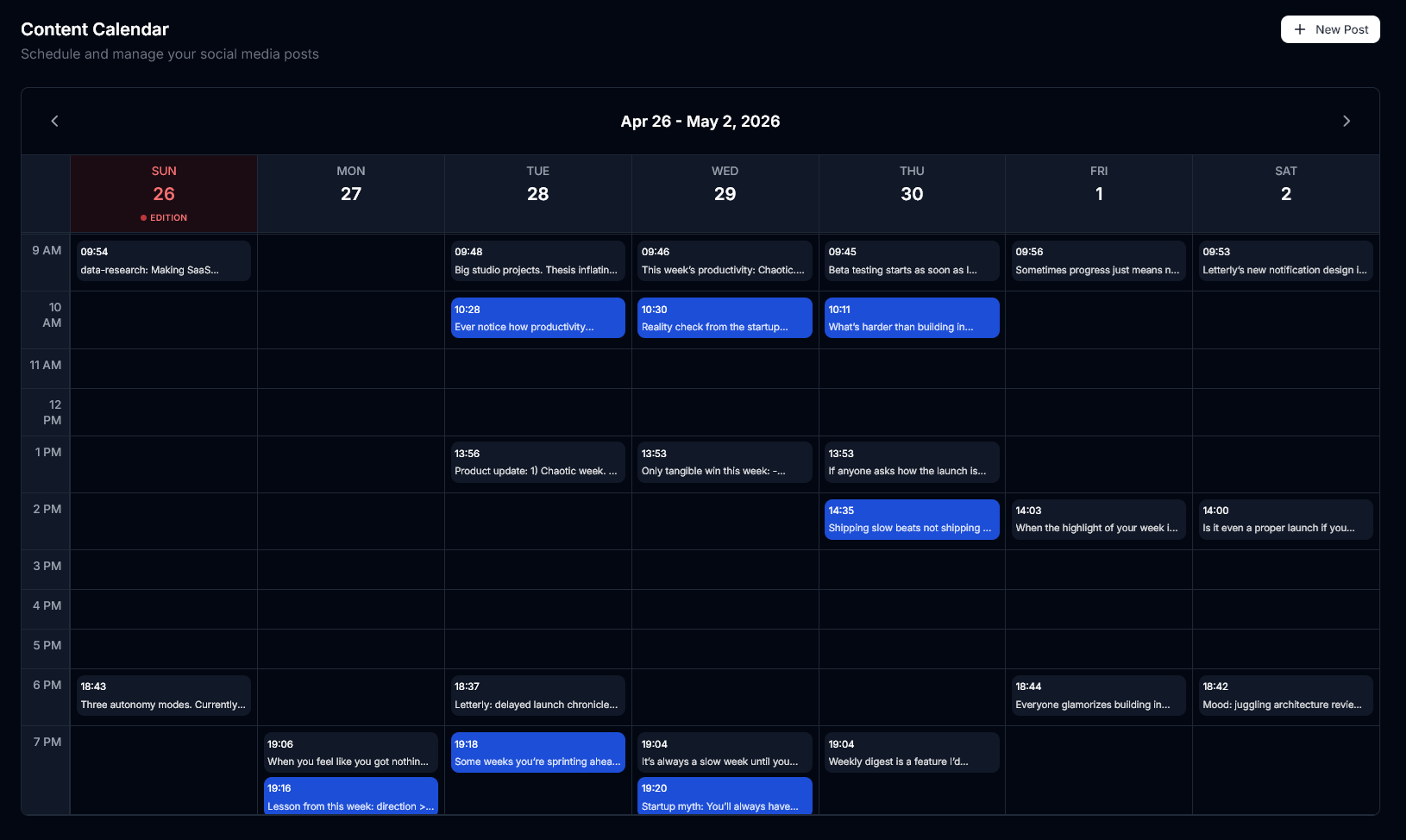
the SaaS I document on my newsletter is called Letterly. it automatically turns your newsletter into posts for x and linkedin the second you publish, which is also what's been helping me grow. here's what a week looks like from one edition on sunday: https://files.catbox.moe/1s8yo2.png

just opened a couple of spots for beta testers. not dropping any links here for the sake of promotion, but if you're curious my dms are open

u/Party_Major5753 — 5 months ago

because it genuinely is.

you spend hours writing your newsletter. researching, editing, getting the tone right. you hit send. and then you're supposed to switch modes and start posting on x and linkedin too? same week, same energy, different formats, different audiences.

most people just don't. and then they wonder why their list isn't growing.

I was the same. I had the newsletter, I had the content, but my social was basically dead. new readers weren't finding me because I wasn't showing up anywhere outside the inbox. growth was slow and honestly demoralising.

so I built something to fix it.

it's called Letterly. here's what it actually looks like in practice: you finish writing your edition, hit send, and close the laptop. a few minutes later your phone buzzes. Letterly already turned your newsletter into posts for x and linkedin and published them. in your voice, not generic ai copy. you didn't write them, schedule them, or think about them once.

that's how I grew my own newsletter past 600 subscribers. social working in the background while I focused on writing.

been building this solo for about a year and a half. opening a small private beta right now, 20 spots, completely free. I'm looking for honest feedback, bug reports, and if it genuinely helps, maybe a testimonial down the line.

drop a comment or dm me if you're interested.

ps. sorry for the promo,but I really think this can help newsletter owners like us and that felt worth sharing.

u/Party_Major5753 — 5 months ago