Open CAD Studio 0.9.6 got improved hatch functionality
✅ Create hatch by selecting internal point
✅ Internal island detection
✅ Create one hatch from several areas
✅ Create hatch by selecting internal point
✅ Internal island detection
✅ Create one hatch from several areas
This tutorial explains how the Polar Tracking functionality in Open CAD Studio works. It also covers the setup of this useful tool.
Hi everyone! I vibe coded a CAD application. If you'd like to check it out, take a look at the GitHub repository:
Open CAD Studio offers external reference (XREF) attachment feature. It is quite straightforward to use – select the file you wish to attach and select the placement point. This attaches the external DWG file to your project. The tutorial also shows how to manage layers of the external reference. The command used to attach external references is XATTACH
Open CAD Studio now comes with support for 8 languages and features 22 new themes.
This tutorial demonstrates basics of working with blocks in Open CAD Studio. Creation of block definition is explained first. Than, insertion of block references and copying of blocks is demonstrated. The tutorial also explains how to copy blocks between two DWG files. The video also explains, how to edit existing blocks – how to add or remove geometry to a block definition. Blocks behave in a certain way with regards to properties of layers and this is also explained. A special behavior of the 0 layer with regards to blocks is also demonstrated.
The tutorial covers basic usage of drafting tools such as LINE, CRICLE, MOVE, COPY, TRIM, OFFSET. It shows how to precisely input coordinates and how to use object snap and polar tracking tools. Basics of working with layers is also covered in the tutorial.
The OCAD web interface has been optimized for phone screens. I made as much space available as possible for the 3D view.
Snap Object (OSANP) enables users of Open CAD Studio to snap to existing points like endpoints, midpoint, intersections, and many other. This is at the core of 2D and 3D drafting, as it enables to easily use existing geometry as a reference for drafting. The video covers all snap object options in Open CAD Studio with practical examples, which demonstrate each snap point target. Open CAD Studio is a free open source DWG authoring tool. It can open and edit industry standard DWG and DXF file formats. It is available to everybody without subscription, license or any login.
You can get Open CAD Studio here: https://open-aec.com/open-cad-studio/
Support the development of Open CAD Studio here: / hakanseven12
New video shows how to download and install OCAD.
Demonstration video of the Open CAD Studio web.
The first community-made OCS tutorial is here!
A huge thank you to the creator for taking the time to make this video. Community contributions like this make OCS even better and help new users get started much more easily.
Enjoy the video!
If you like my work and want to support its development, please consider supporting me on Patreon: https://www.patreon.com/HakanSeven12
Hey everyone,
I've been building Open CAD Studio (OCS), a free and open-source 2D/3D CAD app for architecture and engineering that reads and writes standard DWG/DXF files. The latest update adds three big things I'm excited to share:
🌐 It runs in the browser now
No install, no setup — just open a link and start drawing. The full app loads right in the browser, so you can sketch something quickly on any machine, or share access with a teammate without them downloading anything. The desktop version (Windows/macOS/Linux) is still there if you prefer it.
Try OCS Web: https://hakanseven12.github.io/OpenCADStudio/
🧩 Plugins
OCS is now extensible. Anyone can build add-ons that bring new tools and commands into the app, and there's a built-in browser to discover and install them — so the tool set can grow with the community instead of waiting on me.
Example Plugin: https://github.com/HakanSeven12/opencad-example-plugin
🤖 Automation API
You can now drive OCS from the outside to automate repetitive work — generating drawings, batch-processing files, or wiring it into your own scripts and pipelines. Great for the "I do this same thing 200 times" kind of task.
Automation: https://github.com/HakanSeven12/OpenCADStudio/tree/main/docs/automation
It's completely free, open source, and community-driven. If any of this sounds useful, I'd love for you to try it, break it, and tell me what's missing. Feedback, bug reports, and plugin ideas all very welcome.
Source Code: https://github.com/HakanSeven12/OpenCADStudio
Releases: https://github.com/HakanSeven12/OpenCADStudio/releases
Thanks for taking a look!
If you like my work and want to support its development, please consider supporting me on Patreon: https://www.patreon.com/HakanSeven12
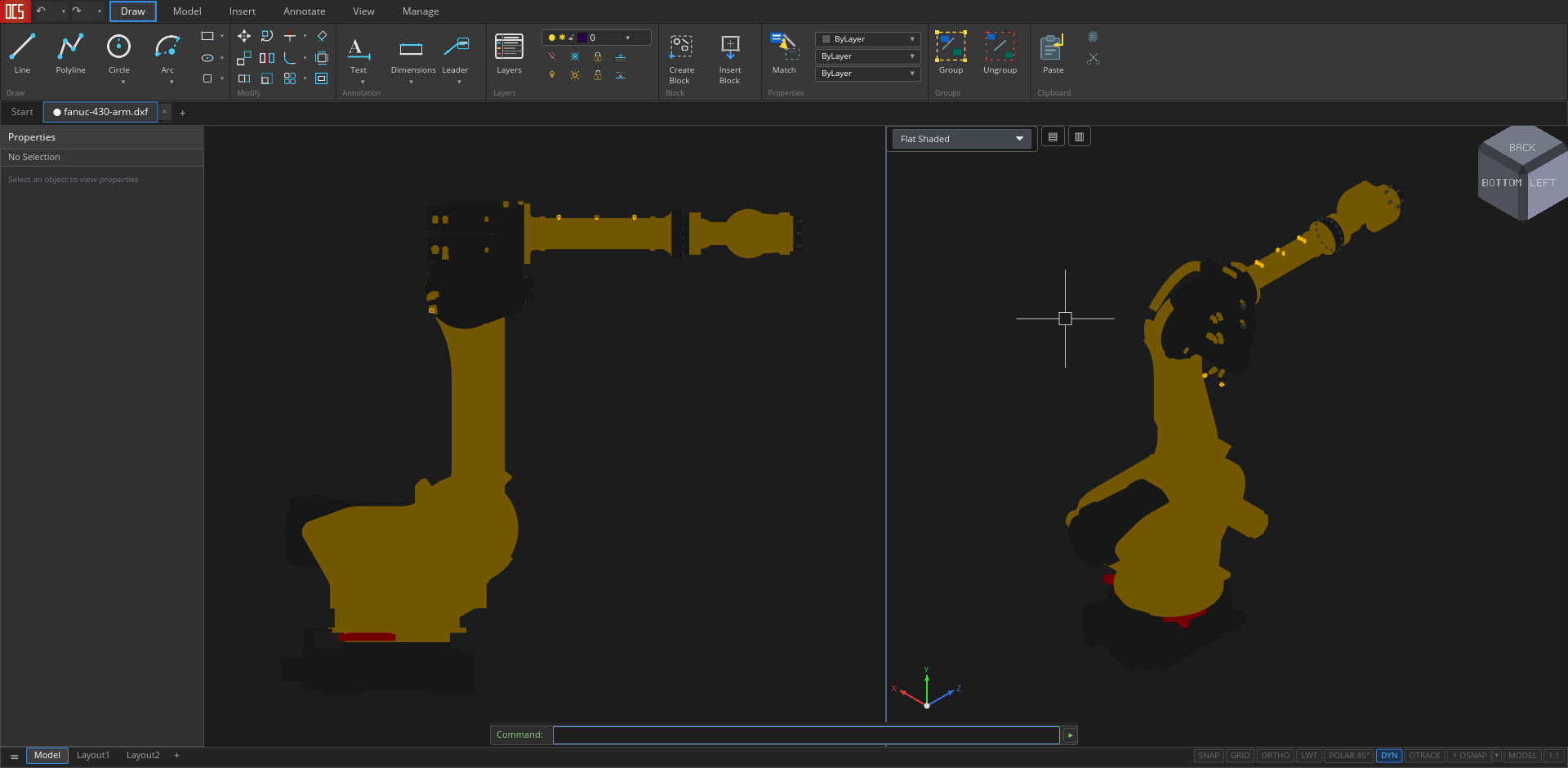
Open CAD Studio: a modern, Open Source 2D + 3D CAD application that reads and writes DWG and DXF natively built in Rust, with GPU-accelerated rendering.
Starts < 1 second. Size 30 MB
No license. No converters. No workarounds. Just open, draw, save.
What's in it:
➡️ Full 2D drafting — LINE, PLINE, CIRCLE, ARC, ELLIPSE, SPLINE, HATCH, OFFSET, TRIM, EXTEND, FILLET, MIRROR, ARRAY, ROTATE, SCALE, EXPLODE… the entire AutoCAD-style command set
➡️ Native DWG & DXF (R13–R2018) read/write — the de-facto industry-standard format, without third-party library licenses
➡️ 3D modelling with ACIS solids tessellation — BOX, SPHERE, CYLINDER, EXTRUDE, REVOLVE, LOFT, SWEEP, ARRAY3D — and 3DSOLID/REGION/BODY entities from DWG render correctly
➡️ Paper space + layouts — multi-tab model space, viewport projection with inline MSPACE overlay, VPORTS presets, plot styles (CTB/STB), PRINT directly to system printer
➡️ Full dimensioning — linear, aligned, angular, radial, diameter, ordinate + DIMSTYLE with everything (DIMASZ, DIMSCALE, DIMEXO, DIMEXE…)
MLEADER, MTEXT, tables, GD&T tolerances, MLINE — with dedicated style managers
➡️ STL, STEP AP203, OBJ import/export, PDF plot, WBLOCK, XREF — everything you need to fit into an existing CAD chain
GPU-accelerated via wgpu — scales smoothly to large models with many solids
➡️ Under the hood: Rust for memory safety and performance, iced for the UI, wgpu for the GPU rendering. Cross-platform: Windows, macOS, Linux. GPL-3.0 license.
➡️ Product page: https://www.open-aec.com/open-cad-studio/
➡️ Repo: https://github.com/HakanSeven12/OpenCADStudio
➡️ Releases: https://github.com/HakanSeven12/OpenCADStudio/releases
Hey everyone,
I've been building Open CAD Studio (OCS), a free and open-source 2D/3D CAD app for architecture and engineering that reads and writes standard DWG/DXF files. The latest update adds three big things I'm excited to share:
🌐 It runs in the browser now
No install, no setup — just open a link and start drawing. The full app loads right in the browser, so you can sketch something quickly on any machine, or share access with a teammate without them downloading anything. The desktop version (Windows/macOS/Linux) is still there if you prefer it.
Try OCS Web: https://hakanseven12.github.io/OpenCADStudio/
🧩 Plugins
OCS is now extensible. Anyone can build add-ons that bring new tools and commands into the app, and there's a built-in browser to discover and install them — so the tool set can grow with the community instead of waiting on me.
Example Plugin: https://github.com/HakanSeven12/opencad-example-plugin
🤖 Automation API
You can now drive OCS from the outside to automate repetitive work — generating drawings, batch-processing files, or wiring it into your own scripts and pipelines. Great for the "I do this same thing 200 times" kind of task.
Automation: https://github.com/HakanSeven12/OpenCADStudio/tree/main/docs/automation
It's completely free, open source, and community-driven. If any of this sounds useful, I'd love for you to try it, break it, and tell me what's missing. Feedback, bug reports, and plugin ideas all very welcome.
Source Code: https://github.com/HakanSeven12/OpenCADStudio
Releases: https://github.com/HakanSeven12/OpenCADStudio/releases
Thanks for taking a look!
If you like my work and want to support its development, please consider supporting me on Patreon: https://www.patreon.com/HakanSeven12
Open CAD Studio: a modern, Open Source 2D + 3D CAD application that reads and writes DWG and DXF natively built in Rust, with GPU-accelerated rendering.
Starts < 1 second. Size 30 MB
No license. No converters. No workarounds. Just open, draw, save.
What's in it:
➡️ Full 2D drafting — LINE, PLINE, CIRCLE, ARC, ELLIPSE, SPLINE, HATCH, OFFSET, TRIM, EXTEND, FILLET, MIRROR, ARRAY, ROTATE, SCALE, EXPLODE… the entire AutoCAD-style command set
➡️ Native DWG & DXF (R13–R2018) read/write — the de-facto industry-standard format, without third-party library licenses
➡️ 3D modelling with ACIS solids tessellation — BOX, SPHERE, CYLINDER, EXTRUDE, REVOLVE, LOFT, SWEEP, ARRAY3D — and 3DSOLID/REGION/BODY entities from DWG render correctly
➡️ Paper space + layouts — multi-tab model space, viewport projection with inline MSPACE overlay, VPORTS presets, plot styles (CTB/STB), PRINT directly to system printer
➡️ Full dimensioning — linear, aligned, angular, radial, diameter, ordinate + DIMSTYLE with everything (DIMASZ, DIMSCALE, DIMEXO, DIMEXE…)
MLEADER, MTEXT, tables, GD&T tolerances, MLINE — with dedicated style managers
➡️ STL, STEP AP203, OBJ import/export, PDF plot, WBLOCK, XREF — everything you need to fit into an existing CAD chain
GPU-accelerated via wgpu — scales smoothly to large models with many solids
➡️ Under the hood: Rust for memory safety and performance, iced for the UI, wgpu for the GPU rendering. Cross-platform: Windows, macOS, Linux. GPL-3.0 license.
➡️ Product page: https://www.open-aec.com/open-cad-studio/
➡️ Repo: https://github.com/HakanSeven12/OpenCADStudio
➡️ Releases: https://github.com/HakanSeven12/OpenCADStudio/releases