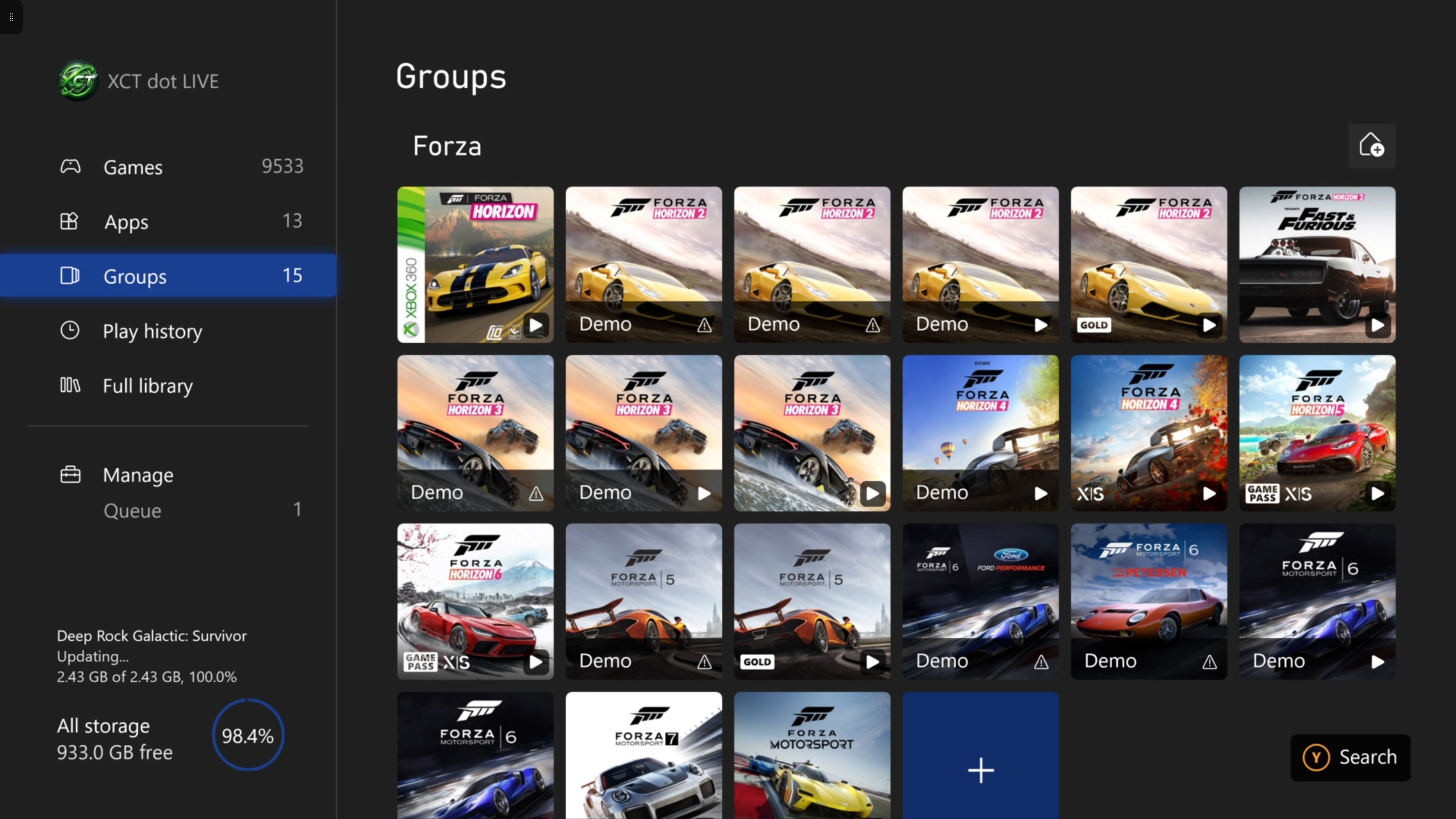
I've not been able to use games and apps for over a month now - ongoing issue

OP: https://www.reddit.com/r/xboxinsiders/comments/1vst1bu/games_and_apps_crashes_when_navigating_to_full/

I am on skip-ahead 10.0.26100.9620

The bug occurs on all rings and production build, and I have tried a different console - a series S - same behaviour on all

This is still happening - there was a line about a fix for large libraries in the last build but it did not fix it for me

I have just submitted a report with full trace - its called 'Games and app crashes when navigating to full library report 4'

Please confirm this is being looked at, I appreciate its edge case and probably only affects a handfull of profiles

Thank you for your time

reddit.com
u/freshowlapp — 11 days ago

New Feature: TargetScan — you pick, we scan

You can now point the scanner at individual games. Pick the ones that look wrong, press once, and their achievements, play time and score are re-checked against Xbox — without waiting for them to come round again.

Why a game goes wrong in the first place
Your library is re-checked when something changes, or when a game goes a week stale. That is the right rule for keeping thousands of titles current, and it is also why a game can sit quietly wrong for days. Four ways it happens:
🎯 The achievement total does not match the individual unlocks.
🎯 0G Xbox 360 achievements never got picked up.
🎯 Play time froze at the moment you stopped unlocking.
🎯 The score never recomputed.

All four are fixed by re-checking that one game: the achievements are refetched, your earned count and gamerscore are rebuilt from those unlock rows, your first and last unlock dates and the span between them are rewritten, and a fresh play-time reading is taken from Xbox.

We have seen this first hand
New members signing up to XCT have had achievements in DayZ, Surviving Mars, Blind Postman and PUBG: BATTLEGROUNDS come unstuck on their first proper scan — achievements Xbox had been sitting on quietly appearing as unlocked. At the time it caused a lot of confusion, and more than one accusation of a hacked gamertag, when all that had actually happened was that the achievements were finally being read properly. This is the same machinery, pointed where you want it.

One game
Open any game page and look at your progress panel: it now tells you when that game was last scanned — “yesterday”, “3 days ago”, or “never fully scanned” — with a Request scanner update link beside it. Press it and the scan usually starts within seconds, because pressing it kicks the scanner rather than waiting for your next one. Requested games jump the queue.

Or two hundred
One at a time is fine when one game is wrong. What actually happens is that a run of them goes wrong together — a bad scan window, a gamertag switch, a batch of 360 titles whose achievements never landed. So turn on Select in the Games list, tick the games (or hit Select all matching filter), and press ◎ TargetScan. The whole selection is queued at once and the bar counts it down — “38 games left to scan…” — until it says complete.

Find what needs it
The Games list has a new Last scanned column (Columns ▾ → Your status). It sorts, which is the point: bring the most out-of-date games in your library to the top, select them, and TargetScan the lot.

Or start from Settings
Every route above starts from a game you are already looking at. If you arrive with the other question — which of my games looks wrong? — there is now a TargetScan panel in Settings, under the force-update scans. Type any part of a name and it searches the games on your own profile, showing each one’s unlock count, gamerscore and when it was last fully scanned, so you can see which are stale before you spend anything. It tells you how many scans you have left today, too.

The questions people always ask
Is this just play time, or everything? Everything for that game: the individual achievements, your earned count and gamerscore rebuilt from those unlock rows, your first and last unlock dates and the span between them, and a fresh play-time reading.

Does it wait for my next scan? No. Asking for it also starts the scanner, so it is normally seconds. Ask for ten games and all ten go in the same pass.

Can I just do all my completed games? On Pro, yes — that is what TargetScan is for. It is one queue drained in order, and the whole batch counts as a single TargetScan, not one per game.

How many do I get? Free accounts get 1 TargetScan a day, one game at a time. XCT Pro gets 10 a day, with any number of games in each — so sweeping two hundred completed games costs one of the ten. Both buttons draw on the same allowance, and the select bar shows what is left before you press.

u/freshowlapp — 2 months ago

Radar — one sweep across your Xbox world

First: thank you. XCT.live just passed 1,000 signups. The best way we know to celebrate a milestone is to ship something — so meet Radar.

One page that watches everything
There is a lot going on across XCT — half a million store listings, your collection, 458,000 tracked achievements, and the leaderboards. Radar puts the pulse of all of it on one page. Every card is a filter with a live count, wearing the cover art of a game inside it. Tap one and you land in that database with the filter already applied.

What's on the sweep
🎮 Unclaimed Free DLC — free, released add-ons for games you own that you never claimed, counted and waiting.
💸 On sale with achievements — everything discounted that earns Gamerscore, biggest saving first.
🆕 Today's releases — what dropped today, counted the moment you open the page.
🏆 Your leaderboards — star any board (★) and Radar shows the top three and exactly where you stand.

Your filters become tiles
Every filter you save in the Store sidebar joins Radar as a card of its own, marked Mine, with its live count beside the XCT presets. The achievement database is on the sweep too — rarest first, secret only, biggest Gamerscore, and the rarest you have unlocked — and every slice is a shareable link now.

Nothing to set up
Presets work for everyone; sign in and your saved filters and favourite boards light up too. Find Radar next to Feed in the nav, or go straight to xct.live/radar.

Here's to the next thousand. 📡

u/freshowlapp — 2 months ago

XCT.live · SuperSearch — supercharge your search, your way

SuperSearch — supercharge your search, your way

Search used to find two things: games with an achievement list, and gamertags. Everything else in the catalogue was invisible to it — DLC, bundles, alternate editions, community guides, hardware, studios. Not any more.

Nine kinds of result, in one search
Type once and SuperSearch answers with released games, unreleased games, DLC, bundles, editions, guides, hardware, companies and gamertags. Each one gets its own block on the results page, with a count, a collapse arrow, and its own click-sortable columns — sorting Bundles never disturbs Games.

It speaks abbreviation
AC finds Assassin's Creed. COD finds Call of Duty. RDR2 goes straight to Red Dead Redemption 2. We seeded 304 curated abbreviations and checked every single one against the live catalogue first.
It handles sequels on its own, too — ac2, me2, gta3, re4, bo6 all work without us storing a row for each. Franchises number their sequels inconsistently (it's Assassin's Creed II but Mass Effect 2), so SuperSearch quietly tries both.
Expansion is additive: a game genuinely called “AC” is still in the list. And when an abbreviation fires, the results page tells you so.

Abbreviations show on the game page
Every game now wears the shortcuts that find it, right under its name — in the same place as translated and renamed titles.

Ask it a question, not just a name
SuperSearch understands variables — type a thing, a comparison and a value straight into the search box:

achievements < 30   gamerscore > 1000   genre = rpg   owned = no

Five variables — achievements, gamerscore, playtime, genre and owned — with the operators you would expect (< > <= >= = !=). Stack them, and mix them with ordinary text.
Playtime is in hours, and a game you have never played counts as zero. So the one everybody wants:

genre = rpg playtime = 0 — every RPG you own and have never started.

The chips under the search bar drop a variable in for you, and SuperSearch says back exactly what it understood — so a typo shows up as a missing pill instead of quietly doing nothing. Short names work too: ach, gs, hours, own.

Your search, your way
The cog beside the search box opens 13 switches. Turn off what you never want to see and it disappears — and because a category that is off runs no query at all, narrowing SuperSearch makes it faster, not just tidier.
Settings are saved to your account, so they follow you to every device you sign in on.

It remembers where you have been
Click into an empty search box and you get your recent searches and the pages you viewed last — how many of each is yours to set, and either can be cleared or switched off. That history stays in your browser and never leaves it.

Also new
A wide search bar now sits at the top of the results page, so searching again never means going back to the sidebar. And the results page finally titles its own browser tab.

Missing an abbreviation you use? Tell us and we'll add it.

xct.live
u/freshowlapp — 2 months ago
▲ 12 r/xctdotlive+1 crossposts

Badge gallery updated with the new Day One 2013 badge (and found some more)

also found:

40 year tenure badge

Mixer Staff 2016-2020 (RIP)

Xbox Insider Program Silver

Xbox Insider Program Bronze

https://xct.live/gallery/badges

u/freshowlapp — 2 months ago
▲ 12 r/xctdotlive+1 crossposts

Games and Apps crashes when navigating to full library

This only happens if my main gamertag is signed in - it has over 100k of items on it so I assume its timing out while indexing my ready to install list

  • Does not happen if my main gamertag is signed out
  • I also had to unset home console for it to not crash with other gamertags
  • Tried a factory reset Series S and series X with all games wiped
  • I have a video if needed
reddit.com
u/freshowlapp — 1 month ago

Welcome to r/xctdotlive — the home of the Xbox Collection Tracker

Hi collectors 👋

This is the official subreddit for XCT.live — a free, community-built tracker for everything you own and play on Xbox: your whole collection across every gamertag, achievements and RealScore rarity, a 580k-title store with prices in every region, leaderboards, Completion of the Day, and XCTrade for swapping physical and digital copies with other members.

Six months in, here's where things stand (live numbers on https://xct.live/progress ):

- 700+ members — a quiet spring, then 489 collectors joined in June alone when "Sign in with Xbox" went live.

- 909 collection scans by 636 collectors with the Powertools desktop app — every owned game, price and achievement pulled in.

- 582k store products, 142k games and 456k achievements catalogued, priced across regions and archived so nothing is lost when Microsoft delists it.

- 57k achievement-carrying products tracked — including 7.9k already delisted and every Windows Phone, Xbox 360 and GFWL title.

- 6.3 million images indexed— cover art, banners, screenshots, trailers, community wallpapers and the classic Xbox 360 avatars.

- $10.8M of games tracked across member collections, 18.2M gamerscore, and 293k XCT Core awarded to members.

- 3,689 commits since 15 February — June peaked at 1,739 in a single month as the feed, teams and gallery all landed together.

- 124 roadmap tickets from 18 members, 74 already shipped — the site is built on what you ask for.

What to post here

- Bugs — page URL + screenshot + gamertag (or "DM me")

- Feature ideas — check https://xct.live/roadmap first and upvote there if it already exists

- Completions, collections, rare finds, XCTrade hauls — show off

- Questions about Powertools, RealScore, scans, anything XCT

Flairs are up — Bug / Feature idea / Completion / Collection / Powertools / XCTrade / Question — please use them.

Not on XCT yet? Head to https://xct.live → Login with XBOX and you're tracking in about a minute.

Thanks for being here — this thing exists because I built it for me, now you can enjoy it and help build it too.

— Rael @ XCT.live

u/freshowlapp — 2 months ago
▲ 41 r/xbox

Today is the day I hit 10,000 games installed on my XBOX

u/freshowlapp — 4 months ago

E203 or E100 during every skip-ahead update

OK every skip-ahead update I either get E203 or E100 - when the update is getting to around 97-99%

I have tried disconnecting all HDDs and expansion card

Sometimes a few reboots will get it 100%

More often I am forced to do a factory reset

Todays skip-ahead is showing:

E203 00000803 80073CF4

Previously I have had:

E100 00000703 80910002

Its a launch day series X

Please advise,

reddit.com
u/freshowlapp — 5 months ago