Image 1 — how i met the god of geometry
Image 2 — how i met the god of geometry
Image 3 — how i met the god of geometry
Image 4 — how i met the god of geometry
Image 5 — how i met the god of geometry
Image 6 — how i met the god of geometry
Image 7 — how i met the god of geometry
Image 8 — how i met the god of geometry
Image 9 — how i met the god of geometry
Image 10 — how i met the god of geometry

how i met the god of geometry

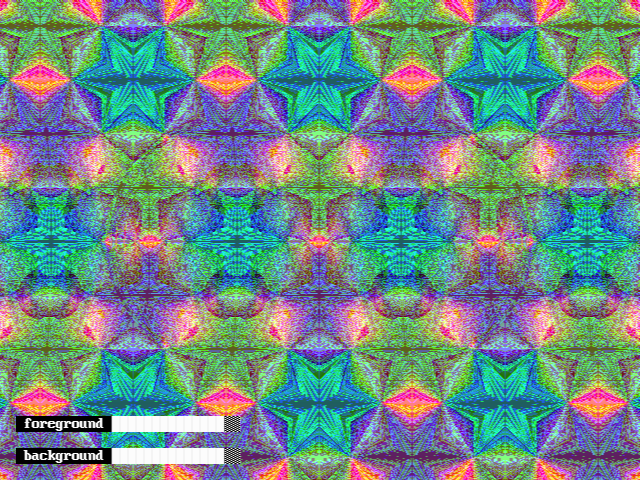
in the beginning there was a triangle. it got colors. it reflected again and again. the color varied with saturation and lightness. it interfered with itself (explanation later) and some patterns emerged. when randomized more patterns emerged. the next to last image looked like nothing but when i added a sphere onto it (use magic eye method to see it), the god of geometry revealed

he revealed once only. as the system randomized i didn't see him anymore

(explanation) when doing computer graphics, floating point error occurs sometimes. if we pick 640x480 as the resolution of rendering, the exact coordinates of the centre should be (319.5,239.5). there is no (319.5,239.5) on a 640x480 screen. for x value we have to pick either 319 or 320

i generated both and added them together. they interfered
u/20260708 — 4 days ago

autostereogram program of platonic solids


program link

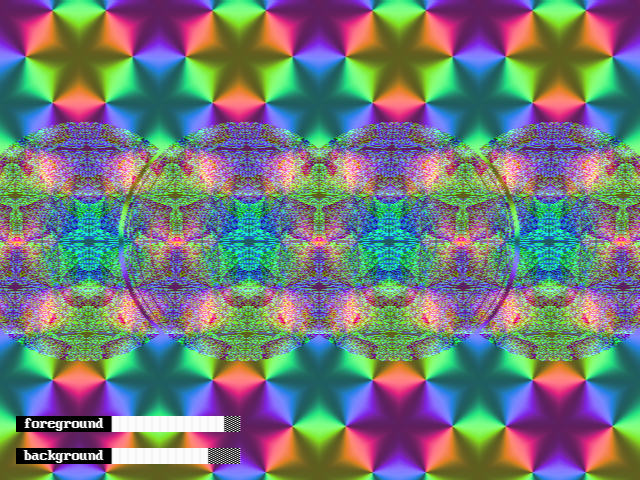
an extension of previous post. just click▶️to run the program on browser. the welcome screen (attached image 1) shows the key map. select a subject (1 to 6) to enter the depth map mode (attached image 2). rotate it or change it until satisfied then toggle to autostereogram mode (attached image 3). adjust the foreground and background pattern widths to your desire (make it easy to focus and spot the subject). you're free to toggle back to depth map mode or rotate / change / disable subject anytime. if you disable the foreground 3d subject it's basically a kaleidoscope (attached image 4). i explained its mechanism in previous post and you can endlessly randomize it to experience the pareidolia effect

some samples

minor math findings

some thoughts

  • qb is very slow. it's not good at handling graphics. lowering the resolution helps but the outcomes would be ugly
  • i learned barycentric coordinate system during the making of this and it's very useful
  • i'm stilling think whether i can optimize some procedures so as to make it faster
  • i have difficulty spotting dodecahedron and icosahedron in autostereogram. they're too "round" maybe. tetrahedron is the easiest
u/20260708 — 5 days ago

platonic solids aligned

there're altogether 5 platonic solids. each of them can be viewed at many different interesting angles or perspectives. we're all familiar with their most symmetric presentations. recently i was studying something related and had to make 3d models for them. i used a maybe less popular perspective to present them. i used spherical coordinate system (mathematics convention) to record their rotations and i picked the following rules to set their initial status:

  1. for each platonic solid set its circumradius=1
  2. place centre of circumscribed sphere at origin
  3. place vertex_0 at the north pole. the corresponding coordinates are (1,0,0)
  4. place edge_0 (red lines on those diagrams) such that its projection to x-y plane align with positive x-axis. coordinates of vertex_1 would be (1,0,φ) for some φ

then i saw some unfamiliar shapes / unfamiliar perspectives of those supposedly familiar 3d objects. in each diagram the small figure at lower left corner is the platonic solid viewed from top. the z-axis is pointing towards you. the large figure at centre is that platonic solid viewed from side. the y-axis is pointing away from you

as you can see from the diagrams the angles φ ranking is as follow, from smallest to largest (the prefix "regular" omitted):

  1. dodecahedron
  2. icosahedron
  3. hexahedron
  4. octahedron
  5. tetrahedron

except octahedron, all other 4 platonic solids are not symmetric if you see them that way

explore more

u/20260708 — 5 days ago

platonic solids aligned

there're altogether 5 platonic solids. each of them can be viewed at many different interesting angles or perspectives. we're all familiar with their most symmetric presentations. recently i was studying something related and had to make 3d models for them. i used a maybe less popular perspective to present them. i used spherical coordinate system (mathematics convention) to record their rotations and i picked the following rules to set their initial status:

  1. for each platonic solid set its circumradius=1
  2. place centre of circumscribed sphere at origin
  3. place vertex_0 at the north pole. the corresponding coordinates are (1,0,0)
  4. place edge_0 (red lines on those diagrams) such that its projection to x-y plane align with positive x-axis. coordinates of vertex_1 would be (1,0,φ) for some φ

then i saw some unfamiliar shapes / unfamiliar perspectives of those supposedly familiar 3d objects. in each diagram the small figure at lower left corner is the platonic solid viewed from top. the z-axis is pointing towards you. the large figure at centre is that platonic solid viewed from side. the y-axis is pointing away from you

as you can see from the diagrams the angles φ ranking is as follow, from smallest to largest (the prefix "regular" omitted):

  1. dodecahedron
  2. icosahedron
  3. hexahedron
  4. octahedron
  5. tetrahedron

except octahedron, all other 4 platonic solids are not symmetric if you see them that way

explore more

u/20260708 — 5 days ago

platonic solids

there're altogether 5 platonic solids. each of them can be viewed at many different interesting angles or perspectives. we're all familiar with their most symmetric presentations. recently i was studying something related and had to make 3d models for them. i used a maybe less popular perspective to present them. i used spherical coordinate system (mathematics convention) to record their rotations and i picked the following rules to set their initial status:

  1. for each platonic solid set its circumradius=1 and centre of circumscribed sphere at origin
  2. place vertex_0 at the north pole. the corresponding coordinates are (1,0,0)
  3. place edge_0 (red lines on those diagrams) such that its projection to x-y plane align with positive x-axis. coordinates of vertex_1 would be (1,0,φ) for some φ

then i saw some unfamiliar shapes / unfamiliar perspectives of those supposedly familiar 3d objects. in each diagram the small figure at lower left corner is the platonic solid viewed from top. the z-axis is pointing towards you. the large figure at centre is that platonic solid viewed from side. the y-axis is pointing away from you

as you can see from the diagrams the angles φ ranking is as follow, from smallest to largest (the prefix "regular" omitted):

  1. dodecahedron
  2. icosahedron
  3. hexahedron
  4. octahedron
  5. tetrahedron

except octahedron, all other 4 platonic solids are not symmetric if you see them that way

u/20260708 — 6 days ago

aligned platonic solids

there're altogether 5 platonic solids. each of them can be viewed at many different interesting angles or perspectives. we're all familiar with their most symmetric presentations. recently i was studying something related and had to make 3d models for them. i used a maybe less popular perspective to present them. i used spherical coordinate system (mathematics convention) to record their rotations and i picked the following rules to set their initial status:

  1. for each platonic solid set its circumradius=1 and centre of circumscribed sphere at origin
  2. place vertex_0 at the north pole. the corresponding coordinates are (1,0,0)
  3. place edge_0 (red lines on those diagrams) such that its projection to x-y plane align with positive x-axis. coordinates of vertex_1 would be (1,0,φ) for some φ

then i saw some unfamiliar shapes / unfamiliar perspectives of those supposedly familiar 3d objects. in each diagram the small figure at lower left corner is the platonic solid viewed from top. the z-axis is pointing towards you. the large figure at centre is that platonic solid viewed from side. the y-axis is pointing away from you

as you can see from the diagrams the angles φ ranking is as follow, from smallest to largest (the prefix "regular" omitted):

  1. dodecahedron
  2. icosahedron
  3. hexahedron
  4. octahedron
  5. tetrahedron

except octahedron, all other 4 platonic solids are not symmetric if you see them that way

u/20260708 — 6 days ago

autostereogram X kaleidoscope

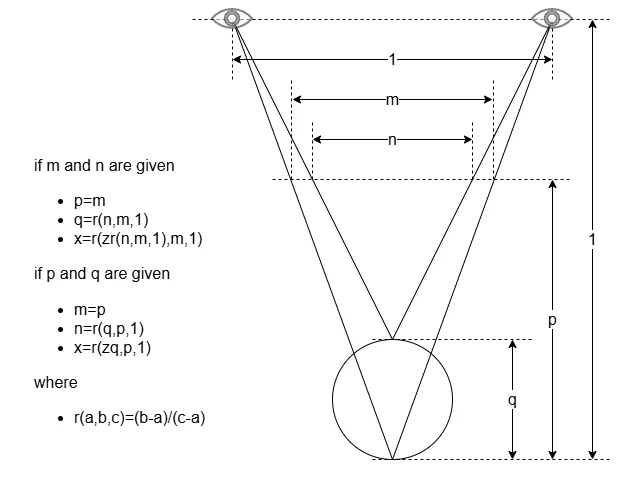
long story short. it was an enlightening journey and i learned a lot from it. one day i came across an autostereogram which was a poster on a wall. i forgot what it was about but it aroused my curiosity of how to make autostereograms. i won't go into the math details here and just give you guys a brief explanation in attached image 1. my program let you control "m" and "n/m". these two variables represent background pattern separation and foreground pattern separation respectively and lie between 0 and 1

the 3d subject is simply a sphere. the background is the result of placing a color wheel in a kaleidoscope. see attached image 2. it can be easily noticed that the hsl system is in use. we can vary the saturation (attached image 3) and lightness (attached image 4) when the angle changes from 0 to 2π. i use the cosine function which reaches maximum at 0 and 2π, minimum at π

the color wheel can start at any angle. so do saturation and lightness. thus we have 3 degrees of randomness. i let you to change the background. every time you hit the relevant button, the hue, saturation and lightness shift by different random angles

here comes the surprising part. autostereograms need "noise" to guide viewers aligning their foci. a pattern that is too smooth is not suitable to act as the background of autostereograms. there'd be no "texture" on the 3d surface. i accidentally discovered that if the screen resolution is set to a number that is not divisible by something in the calculations (i'm not certain which thing it actually is to be honest) some unexpected noise would emerge. see attached image 5

i googled "prime number closest to 640" and the result was 641. i use it as the horizontal resolution

some of those unexpectedly emerging patterns are... strange. some of them look like human faces, some animals, some even aliens. this program is a good place for you to experience pareidolia

here's the program. run it in browser. click▶️to run. click⏹️to exit. when running the program

  • press [q] to make foreground patterns converge
  • press [w] to toggle 3d subject (absent/present)
  • press [e] to make foreground patterns diverge
  • press [a] to make background patterns converge
  • press [s] to rotate the kaleidoscope
  • press [d] to make background patterns diverge
  • press [x] to toggle caption (off/on)

if you want to explore the weird worlds in the background you can disable the foreground and caption. it becomes a kaleidoscope, as shown in attached image 6

u/20260708 — 12 days ago

autostereograms

long story short. it was an enlightening journey and i learned a lot from it. one day i came across an autostereogram which was a poster on a wall. i forgot what it was about but it aroused my curiosity of how to make autostereograms. i won't go into the math details here and just give you guys a brief explanation in attached image 1. my program let you control "m" and "n/m". these two variables represent background pattern separation and foreground pattern separation respectively and lie between 0 and 1

the 3d subject is simply a sphere, quite boring. the background is the result of placing a color wheel in a kaleidoscope. see attached image 2. it can be easily noticed that the hsl system is in use. we can vary the saturation (attached image 3) and lightness (attached image 4) when the angle changes from 0 to 2π. i use the cosine function which reaches maximum at 0 and 2π, minimum at π

the color wheel can start at any angle. so do saturation and lightness. thus we have 3 degrees of randomness. i let you to change the background. every time you hit the relevant button, the hue, saturation and lightness shift by different random angles

here comes the surprising part. autostereograms need "noise" to guide viewers aligning their foci. a pattern that is too smooth is not suitable to act as the background of autostereograms. there'd be no "texture" on the 3d surface. i accidentally discovered that if the screen resolution is set to a number that is not divisible by something in the calculations (i'm not certain which thing it actually is to be honest) some unexpected noise would emerge. see the remaining attached images

i googled "prime number closest to 640" and the result was 641. i use it as the horizontal resolution

some of those unexpectedly emerging patterns are... strange. some of them look like human faces, some animals, some even aliens. this program is a good place for you to experience pareidolia

here's the program. run it in browser. click▶️to run. click⏹️to exit. when running the program

  • press [q] to make foreground patterns converge
  • press [w] to toggle 3d object (absent/present)
  • press [e] to make foreground patterns diverge
  • press [a] to make background patterns converge
  • press [s] to rotate the kaleidoscope
  • press [d] to make background patterns diverge
  • press [x] to toggle caption (off/on)

enjoy

u/20260708 — 12 days ago
▲ 10 r/colors

i finally turn it into a kaleidoscope image generator

u/20260708 — 14 days ago

how does the noise emerge?

recently i'm studying the math behind autostereograms and i wrote a program to test it. i used kaleidoscope effect as background aka base pattern. i didn't add any random factor. on some zoom levels the background are smooth but on some other zoom levels the background have noise. actually i prefer noise as they're supposed to be autostereograms and noise helps viewers to align the focus. the strange thing is hoe does those noise emerge as i didn't deliberately add them and they only appear at some but not all zoom levels

the algorithm is simply the "pixels linking" method. at every point, the program looks up the depth map value and links relevant pixels. closer things have smaller disparity and farther things have larger disparity as shown in this diagram

here's the program and i truly appreciate any ideas or insights

operations

  • run it on browser, no need to install or save
  • click ▶️ to run. click ⏹️ to exit
  • press [q] to make subject patterns smaller
  • press [w] to toggle subject (a sphere/a disc)
  • press [e] to make subject patterns larger
  • press [a] to make base patterns smaller
  • press [s] to rotate the color spectrum inside the kaleidoscope
  • press [d] to make base patterns larger
  • press [x] to toggle caption (off/on)
u/20260708 — 17 days ago