▲ 26 r/OneUIverse+1 crossposts

Finally Liquid Glass on One UI

I have One UI 8.0, but what a launcher this is 😭🔥 I think it’s the best launcher ever.

I love the Liquid Glass look, and finally I can get that style on One UI 🤍

I know I still need to change a few things on my home screen and wallpaper, but I just wanted to show you guys an example.

And honestly, it’s super fast. I haven’t found any issues with it so far, even though it’s still under development.

What do you guys think?

u/gusdavis84 — 7 days ago
▲ 281 r/OneUIverse+1 crossposts

It time for u to start using the routines app, Behold the ultimate routines🫡

These are my top routines, as each of them does a very important job. Last img contains the QR for each of them

u/gusdavis84 — 7 days ago

This could be(not saying this is a fact) upcoming prices for the S27 series in different regions

These prices per region are subject to change.

x.com
u/gusdavis84 — 8 days ago
▲ 129 r/OneUIverse+1 crossposts

Finally, what should've been done since the beginning is done!

One UI now syncs natively with Google Photos. Being entangled with OneDrive felt fragmented in retrospect. Taking the OS from Google and using Microsoft services did not make much sense. Nice move, Samsung.

u/Ashamed-Skirt795 — 8 days ago
▲ 40 r/OneUIverse+1 crossposts

Quickstar

Is there a way I can keep the wifi icon instead of substituting the entire icon to a background on the top left? Something like the brightness and Bluetooth icon

u/SplitWide1773 — 8 days ago
▲ 34 r/OneUIverse+1 crossposts

Experience with one UI 9

All righty so I've had one ui-9 for a half a day today on my 25 ultra camera here's what my thoughts are animations much smoother screen window animation under developer options that's smoother too battery life is still being tested. Voice command seems smoother as well via Gemini thank you very

reddit.com
u/Conflict-Recent — 8 days ago
▲ 112 r/OneUIverse+1 crossposts

Why did they make it thick like that in OneUI 9?

Anyway to fix it?

u/Yah_25n — 15 days ago
▲ 296 r/OneUIverse+1 crossposts

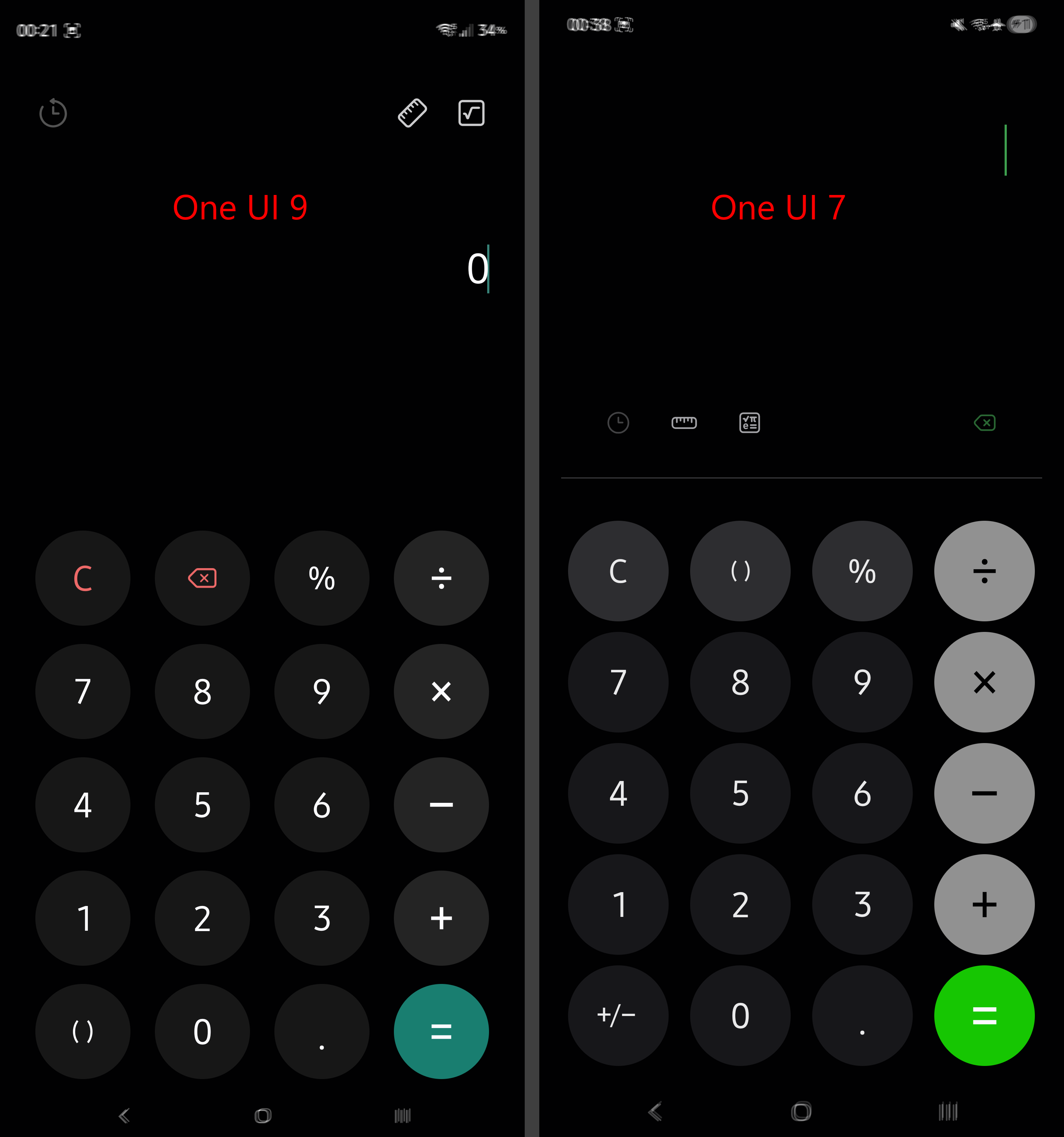
One UI 9 breaks the burn-in protection for the status bar!

Status bar and navigation bar icons are supposed to shift their position every minute, or every time the phone changes screen orientation. These icons are supposed to shift their position few pixels on both X-axis as well as Y-axis.

One UI 9 has a bug where status bar icons only shift their position on the X-axis.

I will attach a screenshot comparison between One UI 9 and One UI 7.

Each image is composed by overlaying three screenshots. Notice how One UI 7 status bar icons shift their position on both X/Y axis. This means One UI 9 will wear out that top part of the screen faster than older One UI versions.

The navigation bar is unaffected by this problem.

I have reported this problem to Samsung during the beta phase, yet it made its way into the public version too. I will report it again through Samsung Members, but you should do it too, in order to make Samsung aware and hope they get to fix it ASAP.

Note: One UI 8 works fine. I have compared it to One UI 7 because I don't have any devices running One UI 8.

One UI 6 had a similar issue, although much worse. Fixed in One UI 6.1.

u/dragosslash — 15 days ago

Set One UI 9 Custom Edge Lighting #samsung #oneui9 #samsungtips #s26ultra

I truly love how customizable OneUI is and with good lock how many things one can do!

youtube.com
u/gusdavis84 — 16 days ago
▲ 84 r/OneUIverse+1 crossposts

(s26+, OneUI 9) Is the pull down menu supposed to look like this...? Feels like everything got magnified 5x after the update, kinda hate it

Second screenshot not mine, OneUI 8.5 menu for comparison purposes

u/RandoDando10 — 16 days ago
▲ 239 r/OneUIverse+1 crossposts

Finally One UI 9 Stable Update is Released for S26 Users in Europe

Finally, Samsung have released the One UI 9 update for non-beta users in Europe for the Galaxy S26 series.

Build version: S948BXXU4BZI6

Other Regions will have it in few hours

u/Pear-Mother — 16 days ago
▲ 43 r/OneUIverse+1 crossposts

One Hand Operation + Setup 2.0

Settings

Left/Right bottom (green) handle size/position: Default

Gesture settings > Short swipe > Swipe distance: Default

Gesture settings > Long swipe > Long swipe duration: 150 ms

Translate: Start application > Google Translate

Search: Home screen shortcuts > Google : Search

Pull screen down: Tap the lock icon to lock the screen in place. If unlocked, tapping the screen exits Pull screen down. Use the slider if the screen isn't low enough.

Tips

  • You can tap the screen to close the Quick Launcher, Task Switcher, etc.
  • You can tap outside the screen area to exit Pull screen down.
  • Quick tools: You can copy part of the screen to the clipboard using Smart Select.
  • Quick tools: You can attach the current webpage to your prompt when using the Gemini assistant app.
  • Quick launcher / Task switcher: Open quick-use apps (like Calculator or Clock) in pop-up view while listening to music on apps that limit background playback.
  • You can open the notification and quick panels while using the Move Screen action by swiping down from the top.
  • You can use One-handed mode instead of Pull screen down by changing all "Pull screen down" actions to One-handed mode.

Credits

Thank you to u/pilotzoo for suggesting the One-handed mode action.

Thank you to u/Far-Commission5478 for suggesting the Move screen action.

u/OilNo5089 — 16 days ago